Neither branches properly
Google branches at section level and only from multiple choice or dropdown questions. Microsoft branches per question but forward only. Neither documents answer piping or compound rules.
The two suites cost exactly the same at every tier, so price cannot decide this. What separates them is response caps, question limits, and how much friction sits in front of a BAA.










Pick by the suite you already pay for, because Workspace and Microsoft 365 are priced identically at every comparable tier. Google Forms wins on free use, quiz analytics, and scale ceilings; Microsoft Forms wins on governance, AI assistance, and a BAA that is available by default. Both have shallow branching, which is where Formester comes in.
Stay in the suite when the responses must sit inside your tenant or under a BAA you already hold. Formester is GDPR, UK GDPR, and CCPA compliant, and is not HIPAA certified.
Head to head on the rows that decide it, verified against both vendors' own documentation.
| Feature |  Google FormsFree with any Google account Google FormsFree with any Google account | |
|---|---|---|
| Free with a personal account | No documented response cap | 200 responses per form, 1,000 on paid |
| Business suite entry price | $7 a user a month annual, $8.40 monthly | $7 a user a month annual, $8.40 monthly |
| Questions per form | No published cap; 300 pieces of content | 200 questions, 400 forms |
| Question types | 12, including grids and linear scale | 8, including Ranking, Likert, and NPS |
| Branching | Section level only, from choice questions | Per question but forward-only |
| Quiz grading analytics | Missed-question rollups, average and range | Real time, but manual grading stops past 50,000 responses |
| Export destination | An independent Sheets file in Drive | Live-connected Excel in OneDrive or SharePoint |
| AI form drafting | Workspace Experiments, trusted testers only | Copilot in Forms, needs a Copilot licence |
| HIPAA BAA | In scope, but an admin must accept a BAA | In scope, BAA available by default via the DPA |
Worth knowing: two claims that circulate about these products are wrong. The famous "300 question limit" on Google Forms is a misreading of 300 pieces of content, and Google publishes no question cap at all. Microsoft is the one with a hard limit, at 200 questions per form.
Both are free with an account and good enough for a poll. These are the ceilings that send teams looking.
Google branches at section level and only from multiple choice or dropdown questions. Microsoft branches per question but forward only. Neither documents answer piping or compound rules.
200 questions per form and 400 forms. Past 50,000 responses it falls back to CSV only, losing summary charts, individual response view, and manual grading.
On a personal account each form accepts 200 responses free, 1,000 on paid. Google Forms publishes no response cap on a consumer account.
No payment field in either product, so anything transactional needs a separate tool. Microsoft's own docs point users to Dynamics 365 Customer Voice once they outgrow Forms.
Both products are free with a consumer account and bundled into every paid business tier. The suite prices match exactly.
Google FormsSuite tiers shown, because Forms is bundled into all of them
Free with any Google account. No documented response cap. Bundled into every paid Workspace tier.
$8.40 a user a month on flexible billing. 30 GB per user, up to 300 users.
$16.80 a user a month on flexible billing. 2 TB per user, up to 300 users.
$26.40 a user a month on flexible billing. 5 TB per user, up to 300 users.
5 TB or more per user and no user limit. Pricing not published.
The free tier is genuinely usable. Google publishes no response cap on a consumer account.
Same suite prices, plus a licence for the AI
Free with a personal account, capped at 200 responses per form and 1,000 on paid. Bundled into every Microsoft 365 Business tier.
$8.40 a user a month billed monthly. Web and mobile apps.
$16.80 a user a month billed monthly. Desktop apps included.
$26.40 a user a month billed monthly. Adds advanced security and device management.
List price billed annually, promoted at $18. Required for Copilot in Forms.
Identical suite pricing, plus $21 for the AI. Free use stops at 200 responses per form.
Per account, not per user. No suite subscription needed
Unlimited forms, unlimited responses, AI form creator, all field types, quiz auto-scoring, drop-off analysis, payment collection.
Everything in Free, plus remove branding, conditional logic and rules, redirect on completion, GTM and GA4, SEO meta tags.
Everything in Personal, plus API access, MCP server, PDF exports, 25 team members, real-time collaboration, 50 GB file storage.
Everything in Business, plus custom limits, unlimited webhooks, high-volume file uploads, unlimited signatures, priority support.
Unlimited responses on every tier. Real branching and payments start on the free plan, with no per-user maths.
Sign Up FreeWorth flagging: the suites are priced identically, tier for tier, on both cadences: $7 and $8.40, $14 and $16.80, $22 and $26.40. Anything claiming one of these two is the cheaper option is comparing different cadences. The only real cost difference is Microsoft's Copilot licence.
Four things neither suite's form tool does, at any price.
Branch on any field, jump in any direction, and route notifications by answer. Both suites branch forward only.
Stripe and PayPal fields on the free plan. Neither Google Forms nor Microsoft Forms has a payment field.
Prompt, question list, or PDF, on the free plan. Google's is a trusted-tester experiment and Microsoft's needs a Copilot licence.
Connect Claude, ChatGPT, or your own agents to submissions on the Business plan. Neither suite ships one.
Three Formester workflows, for when branching depth is the thing you are missing.
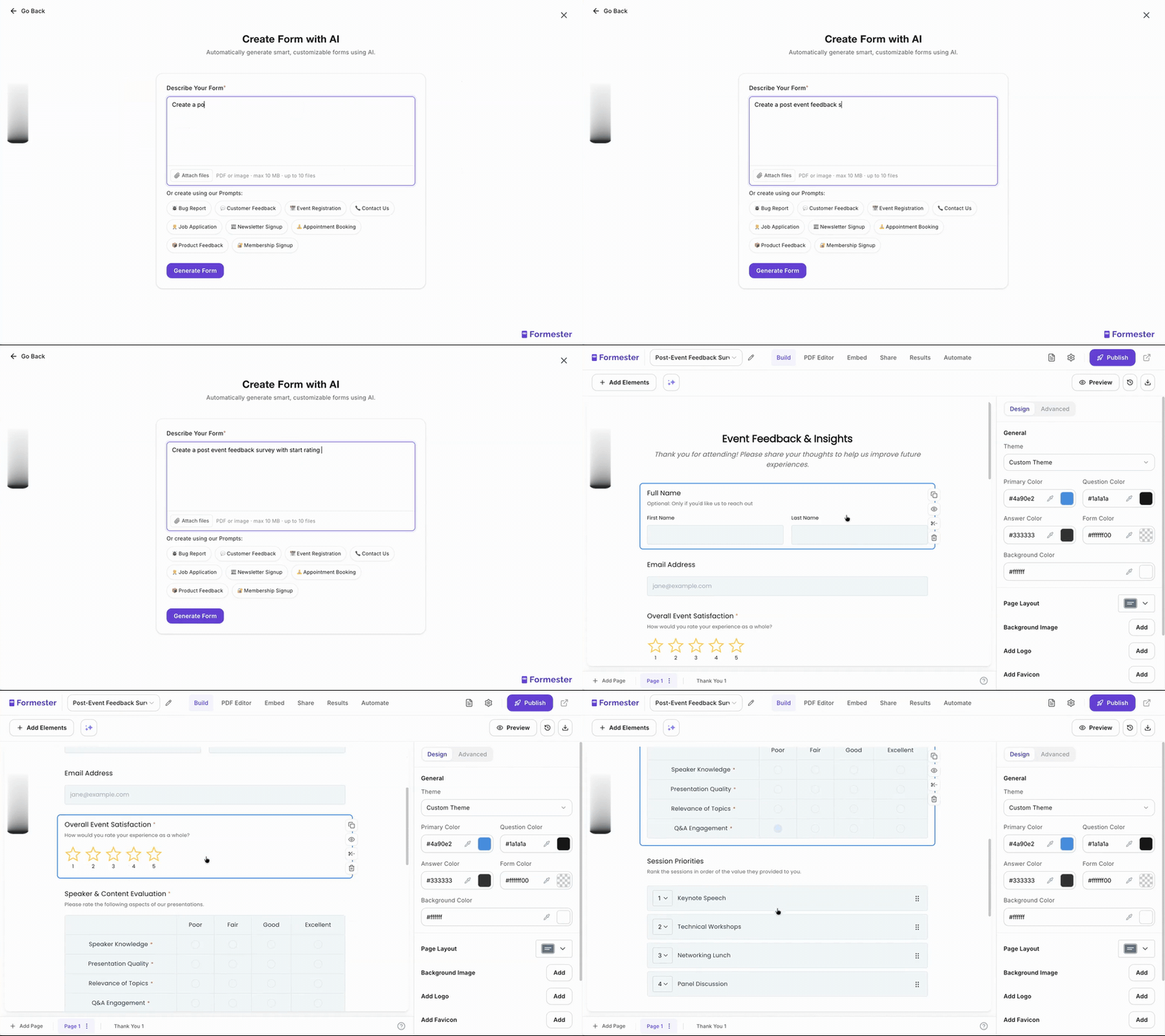
Describe what you need and the AI writes the fields, pages, and design. No licence add-on required.
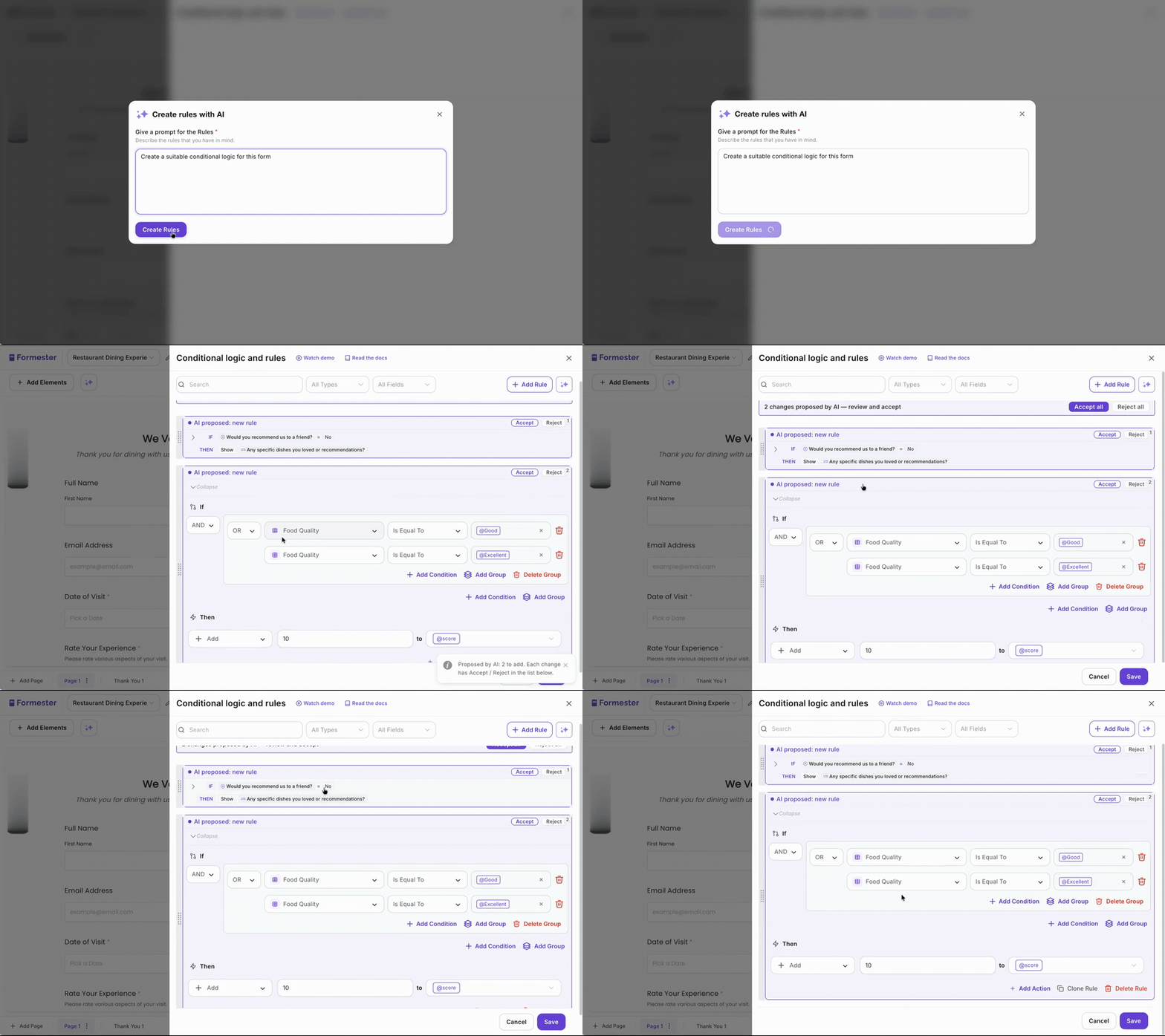
Branch on any field, in any direction, and route email by answer. Both suites branch forward only.
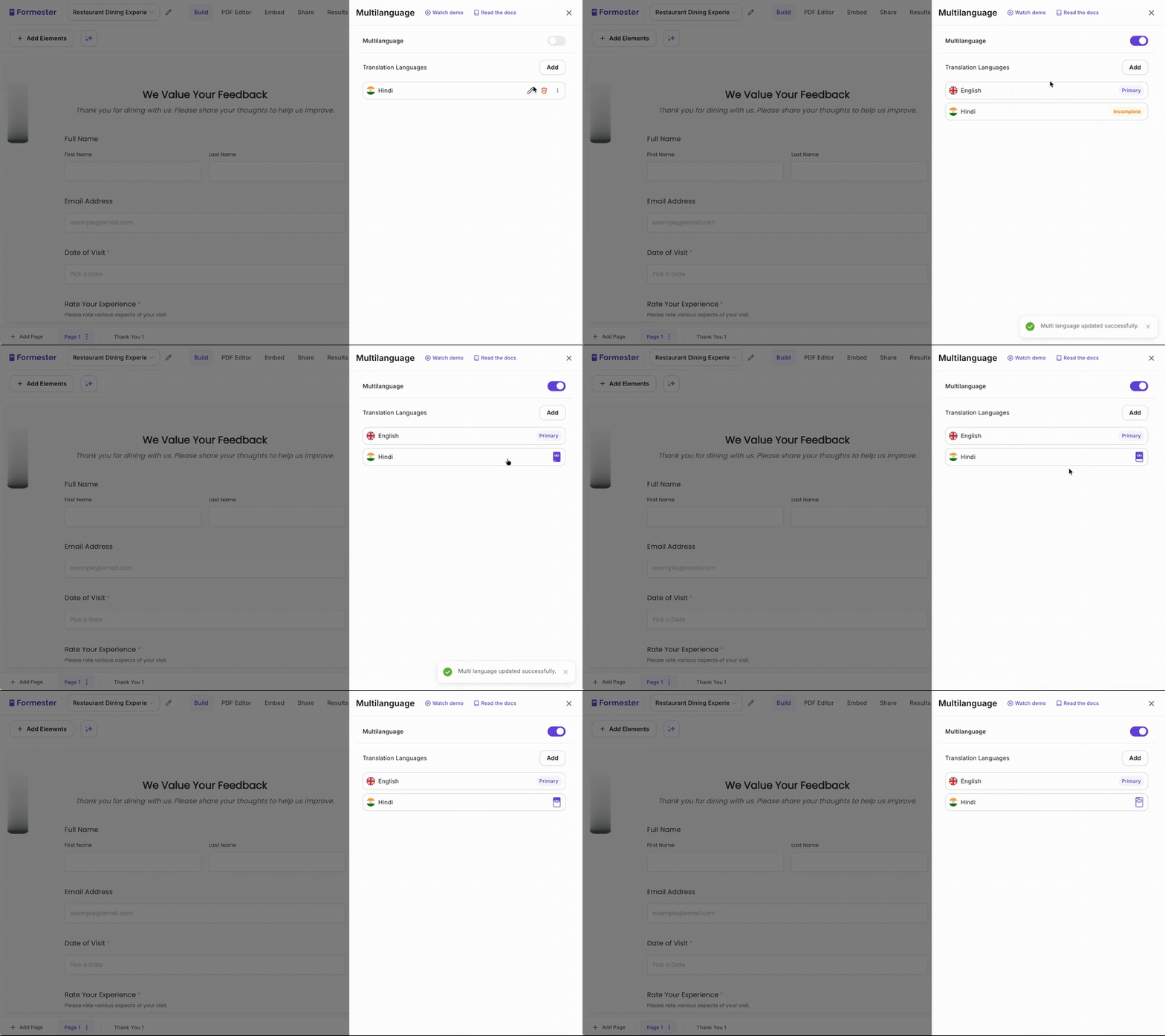
Switch on the languages you need from one panel and AI handles the translation.
For developers
Neither Google Forms nor Microsoft Forms ships an MCP server, so agent access means going through Apps Script, Graph, or a third-party connector. Formester ships both a REST API and an MCP server on the $49 Business plan.
MCP server
Point any MCP-compatible model at your Formester account and ask questions of the data directly, without exporting to a spreadsheet first. Neither Google Forms nor Microsoft Forms advertises an equivalent.
REST API v2
Pull submissions into your warehouse, prefill forms from your CRM, or wire webhooks for created, updated, and deleted events. The token comes from app.formester.com/api in two clicks.
Three steps, and the same process works whichever suite you are on.
In Google Forms, open Responses and link or download the Sheets file. In Microsoft Forms, open the Responses tab and choose Open results in Excel, then take a downloaded copy rather than the live-connected workbook.
Time: about five minutes per form.
Paste your question list into Formester's AI generator or describe the form in a sentence. It drafts the questions, pages, and design in about half a minute, then you add the branching you could not build before.
Input options: plain prompt, pasted question list, or PDF upload.
Publish the Formester link or embed, send one test response, and keep the old form open for a week as a fallback before you close it.
Worth checking: Google Sheets permissions do not stay in sync with form permissions after creation.
Real reviews from G2, Trustpilot, and Product Hunt.
“Formester offers a ton of features and my developer loves using it to integrate to various marketing pages. It's quick and easy to create using drag and drop. It allowed me to remove branding unlike Typeform that has branding even in paid plans. Their support is top notch.”
“Beautiful and easy to use. The templates and the floating button feature with easy-to-use integration with Google Sheet is crazy. I was looking for a simple and beautiful form to put on my website for free.”
“Formester form builder has lots of customisation options. It's very easy to generate online forms. The UI is very attractive and easy to use. No prior experience is required to use it.”
“Formester solves the problem of complicated data collection by providing a quick tool to create customized and automated forms. Ultra-fast form creation thanks to drag and drop.”
“Great form and always good support. Easy to set up, easy to share, and the team behind it actually responds when you need something.”
“We are able to easily build so many forms for our daily business work. These are easy for sharing too with our clients at one time instantly. There is also a feature for identifying if there is any spam in the form filling process.”
“Reached out using the chat and got a real person who actually helped solve my problem and figured out a creative solution for making my form look and function exactly as I intended. Very quick to respond too and so helpful!”
“The team behind Formester have been extremely helpful, courteous and welcoming of feedback and ideas. They have always met and exceeded every challenge set to them and work tirelessly to keep evolving Formester. They have created by far the best online form creator I have come across, and I have used a lot over the past decade!! It is intuitive, smooth and looks good with lots of customisation features that competitors are severely lacking.”
“Formester brings together some amazing technology all in one easy to use tool. The AI form builder makes things a breeze to set up and completed 75% of my build and then another 25% tweaking. Combined with the AI agent workflow automation after forms are submitted, it's one amazing package. Ankit from customer service was awesome too. Great job Formester!!”
“We were looking for a new platform for building quizzes for our educational program. This one has not let us down. It has tons of features and is easy to use. The company is super responsive if you have questions or need help with anything. We are looking forward to a long relationship.”
“Formester is an incredibly professional company. They are very helpful, they help solve any problems quickly. The form was originally very customizable, but there were a few features that were not originally included or available. At my request, these features were enabled and changed in a short time, so I was able to completely customize my Quote Form to my needs. I can hardly imagine a better form creation program. The only drawback is that not all options are free, but even boys have to make a living. :) I hope they always remain so professional.”
“great support and the price-performance ratio is good.”
“A great, intuitive platform, clear, fast, with many ready-to-use components, an easy-to-use rules editor, but what's most important in IT is... people. Quick contact, substantive questions and answers, and immediate implementation of necessary changes. They added a new feature at my request faster than I could finish my coffee :-) Flexible and attractive pricing; I'll be staying here longer than I thought. I recommend it.”
“Loved formester. I used it for a survey for a work project. Loved the collaborative form feature allowing multiple users to work on the same response”
“After trying out many different providers, we ended up with Formester, an affordable provider with all the necessary tools to create a great quiz. In addition, they offer personalized customer service that helps you achieve your desired end result down to the last detail. Excellent experience, I would recommend it to anyone.”
“Its by far the best form builder I've used, its got really good ui, and its super easy to use. I create my first form few months ago and never looked for an alternative!”
“I am really impressed with this app/plugin. I looked for ages to find a free with upgrade option that I could use for a personality quiz on my website and couldn't find a good one. Then I saw this recommended on Reddit and I gave it a try. The app makes beautiful forms, and it is SO EASY. Loads of templates to use. I had issues with a few things and I contacted support and they responded almost immediately. I will definitely be upgrading to the paid version when I hit the quiz limit as the free version has been awesome. Recommend A+++”
“Amazing customer service and form that fits all my needs. Have even requested for several features which they delivered within a week. Bugs are acknowledged and fixed quite quickly, usually within 2 working days. The team is very very responsive on the live chat! Will definitely use them for a long time”
“The free plan is the best out of all the options I've compared. The AI is also very helpful.”
“Awesome product and amazing support from the team. Started using it a few months ago for my art business- couldn’t recommend formester enough!”
“Went through many form Builders for my Lead gen company And I will say it is by far the most affordable and customizable form I have found!! 10/10”
“This app has everything you need. And i had a Very good experience with support team.”
“We have been in business for over thirty years and were never happy with our ability to communicate successfully and professionally (and easily) with our clientele UNTIL we found Fomester. NOW, we have a way of providing our clients with an EXPERIENCE when completing and submitting online forms needed for us to provide them with outstanding client care. Imagine that - clients actually ENJOYING completing and submitting online forms. I never thought it was possible until we found Forrester. If you are looking for a platform to use for creating online forms and channels of communication with your clients, then look no further. - Formester is the best. Your organization will look professional, and your clients will thank you!”
“Great experienced with this form, quite huge space for storing data or forms! Amazing features and easy to monitor!”
“Great software system. Very intuitive and looks absolutely great. Most importantly, I had some things I wanted it to do that were not implemented. I requested the features, Ankit started an online meeting with me and the features were implemented within hours. Stellar support that is hands-down better than others. I highly suggest you use Formester over the other options since it is so simple to use and Ankit is very focused on meeting users requirements/needs. You're not going to find that with the competition.”
“Formester is one of the best underrated survey tools out there. I was looking for an alternative to Google Forms and chanced upon many, including Formester. Formester has everything I want in a form creator. It's UI is intuitive, simple to understand. Yet, I am able to access every feature they offer within the forms builder page. They provide every kind of element you would want for your survey, including standalone elements like text/images, and all types of survey question formats. Within the questions you have multiple options to make the questions to your liking. It's extremely customizable, from design options body style/text size, font, style, to non-essential effects that improve the experience for users filling up these surveys. It provides logic options for you to change the order or visibility of questions. and an email sending feature with your own SMTP account (although I didn't use it). Their support is awesome, nothing like I've experienced. I received a straighforward answer for a feature I was trying to find, encountered an technical issue that would require a re-deployment to fix, and they acknowledged the issue, promising to keep me updated on when it was fixed. I'm extremely appreciative of the service they offer and the service of the form builder itself. Formester is certainly a viable alternative to Google Forms. The free tier is enough for small personal projects in which you shouldn't expect to burst its response limits. Most of the features that you need are all in the free plan, with paid-only features meant for businesses. I absolutely recommend this to anyone looking for an alternative to the usual form creators, or to spice up your surveys and make creating them more satisfying.”
“I use Formester for my form-building needs and I'm thoroughly impressed. Their platform is rich with features, making it incredibly user-friendly and efficient for any form-building task. What really sets them apart, though, is their exceptional customer service. Responses to queries are lightning-fast, typically within 10 minutes, which is a rare find in customer support these days. The pricing is also very reasonable, offering great value for such a high-quality product. Overall, Formester.com is an outstanding choice for anyone in need of a reliable and feature-rich form builder. Highly recommended!”
“Formester's Drag-and-drop functionality and pre-designed templates make creating forms extremely quick and easy. It's extensive customisation options allows you to tailor forms to your specific needs and branding. The conditional logic, file uploads, and integrations with popular tools like Mailchimp and Zapier make Formester extremely versatile too. I was also impressed with their exceptional support. The team was prompt, knowledgable and friendly in addressing my questions. Since I started using Formester in Dec 2023, the developers have added the quiz function and the provision to add multiple fields in the same row.”
“It is an incredible combination of simplicity and power in my opinion. Formester with just a few minutes, can effortlessly create and launch your forms, all while seamlessly connecting with various integrations. The founder and the dedicated staff are truly outstanding, helpful, and motivated.”
“I loved how accurate and on point the pre-designed templates are. You can just select a pre-designed template and add the logo of your brand boom! Its ready to be live. The ready made templates make it super easy and time saving product.”
Both are genuinely the right answer in some situations. Three of them.
For a poll, an RSVP, or a class quiz, either is free and already in your account.
Choose either suite for simple, internal, one-off forms
Microsoft's live-connected Excel in OneDrive or SharePoint keeps responses under existing governance.
Choose Microsoft Forms when tenant governance is the requirement
Google documents the richer grading analytics of the two.
Choose Google Forms for quizzes and grading
You do. Everything moving through your forms is Customer Data: the prompts you type, the structures the AI drafts, and every response someone submits. Section 4.4 of our Data Processing Addendum bars Formester from using any of it to train AI models, run advertising, or feed analytics and marketing. The Google Gemini integration that drafts forms works inside the same boundary.
Responses travel over TLS, sit encrypted at rest, and payment data carries an extra AES-256 layer through Stripe. Formester is GDPR, UK GDPR, and CCPA compliant. We are not SOC 2, ISO 27001, or HIPAA certified, and the security page says exactly that instead of hinting otherwise. Compensating controls are in place: encryption in transit and at rest, annual third-party penetration testing, enforced 2FA, and encrypted backups.
Don't take our word for it. Run these prompts in your favorite assistant and compare what comes back.
"Do Google Forms or Microsoft Forms support answer piping and multi-field conditional rules?"
Open in ChatGPT → Claude"Is Google Forms in scope of the Google Workspace HIPAA BAA, and how does that compare with Microsoft Forms?"
Open in Claude → Perplexity"Google Workspace vs Microsoft 365 business pricing per user in 2026, annual and monthly"
Open in Perplexity →If neither suite's form tool is enough, these four come up most often next. Each has its own comparison.
Everything else people ask when choosing between Google Forms, Microsoft Forms, and Formester.
The same drafting engine, pointed at the other things you build every week.
Any form from a prompt, question list, or PDF. Live in minutes.
Explore →Describe the audience and goal; the survey writes itself.
Explore →Auto-graded quizzes with weighted scoring and outcome routing.
Explore →One source form, 180+ languages, translations kept in sync.
Explore →Free forever, unlimited forms and responses, real conditional logic, and payments on the free plan. Two minutes to sign up, no credit card.
Get Started – It's Free!