AI Quiz Maker that turns any prompt or a PDF into a scored quiz in 30 seconds
Create quizzes faster with AI. Just enter a topic and our AI quiz generator will generate questions, answers, and scoring for you. Customize your quiz, share it anywhere, and track responses in real time.

Create Quiz for Free
Trusted by 56,000+ teachers, trainers, HR teams, and marketers.
Create quizzes with confidence. Formester is rated highly across leading review platforms for its AI quiz generator, ease of use, and automatic scoring features.

Why teams pick Formester over the ten other AI quiz makers
Generating the quiz is the easy part. The reason you stay is what happens after.
Create Engaging Quizzes Faster
Design fun and interactive quizzes that keep your users engaged using AI, whether they’re for learning or entertainment.
Quick and Easy Setup
With our AI-powered outcome quiz maker, you can create quizzes quickly, even if you have no prior experience.
Score it your way
Implement a robust quiz scoring system to accurately reflect user performance, enhancing their learning experience.
Fully Customizable Outcomes
Tailor quiz outcomes based on users’ responses, making every quiz unique and relevant.
Edit every question before you ship
AI writes the first draft, not the final one. Reorder questions, rewrite answer choices, change the correct answer, or delete the ones that don't fit. Your quiz, your wording.
Instant Results and Feedback
Get immediate results for your participants. They'll know their scores or outcomes right after finishing the quiz.

Share as a link, QR code, or embed
Every quiz comes with a public link and a QR code, and embeds on any site with a two-line snippet. Put it in an email, a training module, a Slack message, or a product page. Responses land in the same dashboard either way.
Use for Multiple Use Cases
Use quizzes for various purposes, like education, customer feedback, or team training, making your quizzes valuable across different fields.
How to create a quiz in under a minute
Here's how to create outcome based Quiz in 6 steps under 30 seconds.
STEP 1
Create a prompt or Upload PDF
First create a prompt or upload a PDF that clearly outlines the type of quiz you want to create and the outcome you want to show.
For example "Algebra basics for grade 9, 10 multiple-choice questions" or upload a PDF of the chapter, training deck, or article you want to test on. Formester reads it and pulls out the facts worth testing.

STEP 2
Input in the AI Quiz Generator
Next, put the prompt in the AI quiz maker. Make sure to select the Outcome Quiz option.

STEP 3
Add Questions
Choose how many questions and the format you want (multiple choice, single choice, dropdown, image-based, or video). Scored or outcome, single section or multi-section, timed or untimed, with answer validation on or off.

STEP 4
Generate, Review and Customize
Once everything is ready, click Generate and wait for the AI to create the quiz. Rewrite the wording, swap a correct answer, add a question the AI missed, change the point values, set a passing score. Nothing ships until you say so.

STEP 5
Test & Publish
Head over to the Outcome Quiz feature under Advanced tab to review the outcomes.
Then preview your quiz to ensure everything works fine. Once satisfied, publish it and start collecting responses!

STEP 6
Share and track
Publish as a public link, generate a QR, or embed the quiz on your site. Every submission lands in the dashboard with score, time taken, completion rate, and partial-submission recovery. Push results into HubSpot, Salesforce, Google Sheets, Slack, or any of the 1,000+ apps Formester connects to.

What Teachers, Trainers, and Marketers love about Formester Quizzes
Limit responses
Set a max number of submissions, a close date, or a passing-score cutoff that hides the quiz after it is met. Useful for timed tests, first-100-respondents lead gen, and waves of training that need to end on a specific day. Learn about form limiter →

QR code on every quiz
Every published quiz ships with a QR code. Print it on a handout, put it on a slide at the back of the room, drop it in an email footer. The QR links to the same takeable quiz as the share link. Learn more about QR code generator →

Auto-translate the quiz
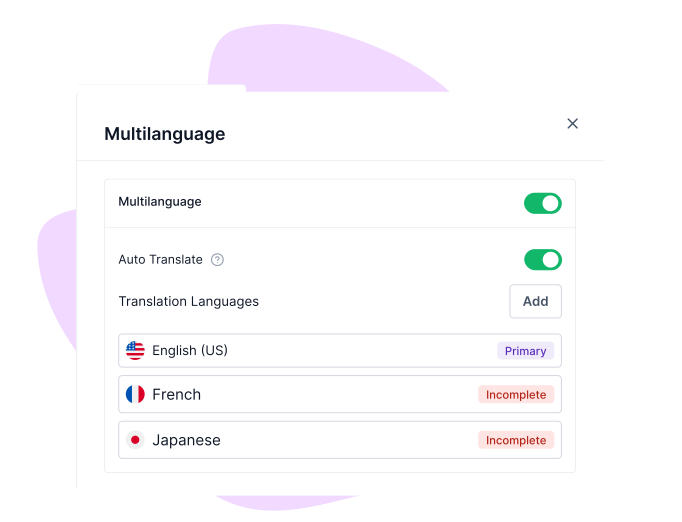
enerate a quiz in English, then publish localized versions in additional languages with AI translation, without rewriting the logic. Scores, outcomes, and analytics merge across languages so you're reporting on one quiz, not many. Learn more about Multi-language translations →
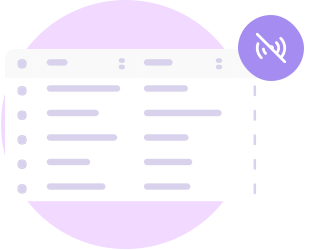
Offline quizzes that sync without internet
Install the Formester app on a laptop, tablet, or phone and the quiz works without a connection. Responses cache locally, and the moment the device reconnects, every submission syncs into the dashboard automatically. Useful for fieldwork, on-site events, or training rooms with bad wi-fi. Learn more about Offline forms →
Who uses the AI quiz maker
AI quiz maker is built for anyone who needs fast, reliable, and professional quizzes without manual work.

Teachers
Upload a chapter PDF or paste your lesson outline, and Formester drafts a graded quiz that maps to what you actually taught. Auto-score it, turn on answer validation so each wrong answer comes with a hint or explanation, and watch the dashboard for the kid who is falling behind in week four, not week fourteen.
Marketers
Lead-magnet quizzes that score the visitor, route them to a result page with their outcome, and drop the qualified lead into HubSpot, Salesforce, or Mailchimp via the integrations Formester ships with. Apply your branding kit so the quiz matches the campaign, split-test the result-page copy, and watch drop-off by question in the analytics view.
HR Teams
Onboarding knowledge checks, annual compliance refreshers, and policy-comprehension tests that prove people read what you sent. Formester tracks attempts, time spent, and passing scores per hire, with conditional-logic branching so a missed question routes the employee back to the right policy doc before they retake.
Coaches & Trainers
Pre-call diagnostics, personality-style intake quizzes, and progress check-ins. Outcome logic routes each client to a custom result page with their own image, copy, and next step, and responses sync into your CRM so you walk into every session already briefed on what they answered.

Course creators
Generate a diagnostic quiz from a prompt that names the course topic, a module check from each chapter PDF, and a final summary quiz from the whole syllabus. Mix scored and outcome logic so the same quiz grades knowledge and routes students to the next module based on what they got wrong.
Free Online Templates
Get Started with Free Templates
USER TESTIMONIALS
Testimonials
Formester is really easy to use and an exceptional alternative for Typeform. We use it for call for papers, lead registrations, feedback and surveys and it cannot be simpler.

I really enjoy Formester. It’s clean and straight-forward and it does well, what it is supposed to do.

Ready to build your perfect form?
Get access to advanced AI, unlimited forms & more. See pricing for more details.
FAQs About AI Quiz Generator
Yes. AI quiz generation and quiz building are on every plan, including the Free plan at $0/month. Free includes 10 forms, 100 responses per month, all field types, quiz auto-scoring, drop-off analysis, and payment collection. Free-plan quizzes show Formester branding (removed on Personal at $13/month). API access starts on the Business plan. Full breakdown on the pricing page.
An outcome quiz gives personalized results based on user answers. It helps users get tailored recommendations or insights instead of just a score.
A scored quiz assigns points to answers and shows a final score at the end. It is useful for tests, assessments, and knowledge checks.
Paste a prompt that names the topic ("Algebra basics for grade 9, 10 questions") or upload a PDF of the chapter, deck, or article you want to test on. Formester reads the source, pulls out the facts worth testing, and drafts questions with answer choices, the correct answer, and optional explanations. You then review, edit, and publish. Nothing goes live without your sign-off.
Yes. You can set scoring rules, adjust points, and customize outcomes based on user responses to match your goal.
Yes. You can modify questions, answers, scoring, design, and logic anytime before or after publishing.
You can create scored quizzes, outcome-based quizzes, personality quizzes, assessments, and feedback quizzes for any use.
Three options ship with every quiz: a public link you can send anywhere, a QR code for handouts or in-person sessions, and an embed snippet that drops the quiz into any webpage. Responses land in the same dashboard whichever channel they came through.
Yes. All quizzes are mobile-friendly and work smoothly on desktop, tablet, and phone.
A short prompt, a list of questions you already have, or a PDF of the source material. Type the topic and let the AI write the questions, paste in your own list and let it format and score them, or upload the document you want the quiz to be built from.
Multiple choice, single choice, dropdowns, image-based questions, and video questions. A single quiz can mix any of them, and each question can carry its own point value, a correct-answer explanation that fires through answer validation, and a place in a timed or untimed section.
Yes. Each question lands in the editor with the source passage next to it. Rewrite the wording, swap the correct answer, add distractors, delete the question, or add one the AI missed. The review step is the default step; you do not have to click around to find it.
Use a scored quiz when you care about right and wrong — training checks, employee certifications, classroom tests. Use an outcome quiz when the goal is to route the taker to a result based on their answers — lead magnets, personality tests, product recommenders. Formester lets you combine both in one quiz if you want, so a marketing quiz can score the lead and route them to the right offer at the same time.
Per-question point values, weighted categories, pass/fail thresholds, quiz timers, and conditional branching based on score or specific answers. Outcome routing lets you map any combination of answers to a custom result page with its own copy, image, and CTA. Answer validation can show an instant hint or explanation when a learner picks the wrong answer.
Yes. Every quiz is responsive by default, and quiz takers can finish on phone, tablet, or desktop. Offline mode captures responses on flaky wi-fi and syncs when the device reconnects.
Published research (BMC Medical Education, 2025) shows that AI-generated multiple-choice questions hit a decent discrimination bar roughly 38% of the time on the first draft, and around 6% carry a factual error. That is why Formester grounds every question in the content you uploaded, shows the source passage next to the question during review, and ships nothing until you click publish.
No. Per Section 4.4 of our Data Processing Agreement, Formester does not use Customer Data for analytics, advertising, marketing, or product training. The same boundary applies to the Google Gemini integration that powers our AI features. Your uploaded PDFs, prompts, and quiz responses stay on your account, encrypted in transit and at rest, with full deletion available on request. Read the DPA and the security overview.
es. Formester ships an MCP server (Model Context Protocol) that any MCP-compatible AI agent Claude, ChatGPT, custom agents can read in one connection. Ask plain-language questions like "Which students scored under 60% this week?" or "Show me everyone who got Q4 wrong," directly from your AI assistant. There's also a public REST API (v2) with a self-service token for direct integration. See the API docs and the MCP server guide.