Capture what the process needs
Use a form to collect the information a process needs, with the fields and logic required to route it correctly.
A form only starts the job. Formester routes each request to the right person, handles approvals and follow-ups, sends data to your other tools, and tracks every step until the work is done. No code. No separate automation tool.
Free plan includes 100 workflow runs a month. No credit card required.
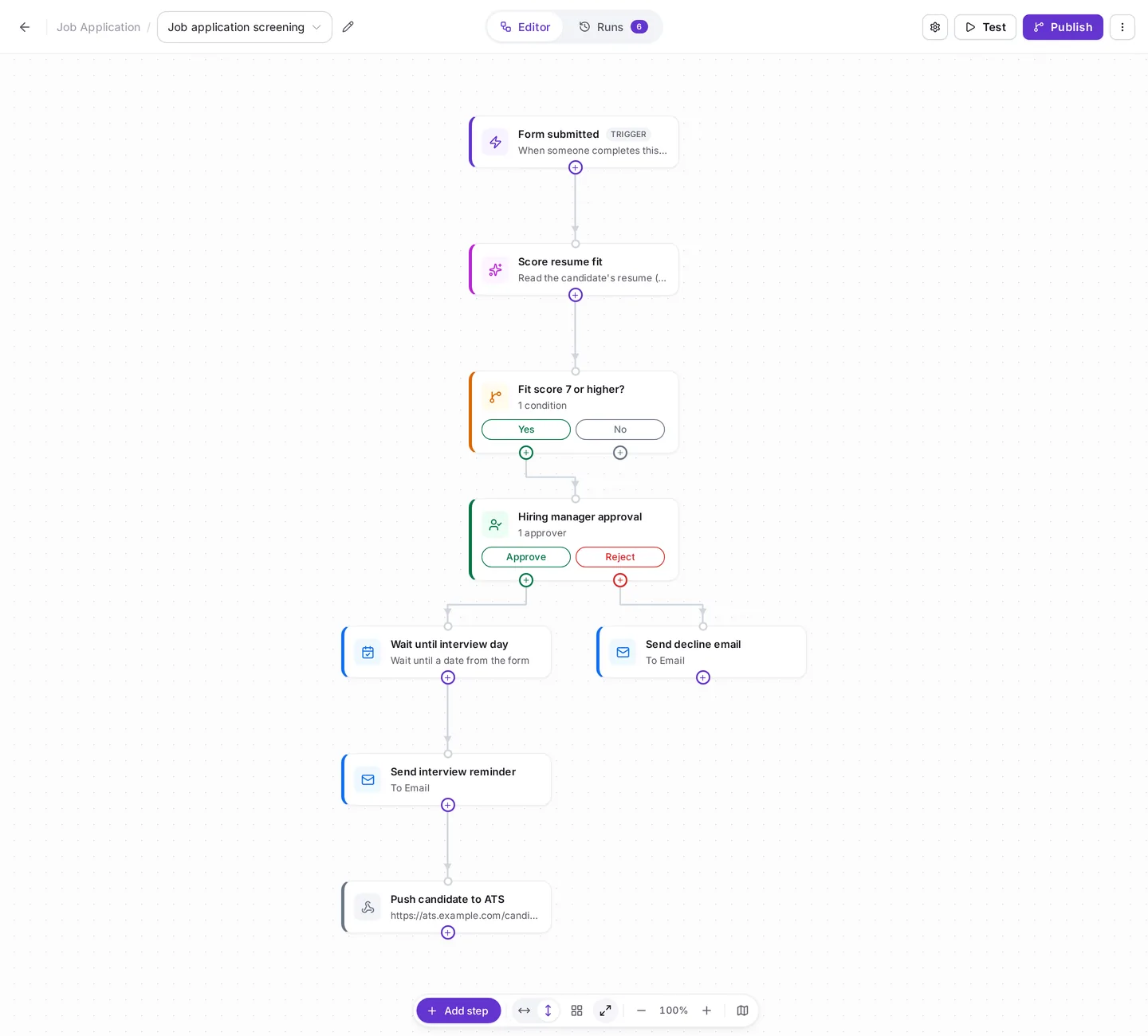


Most forms stop at collection. The real work starts after someone clicks submit.
A request arrives in an inbox. Someone copies the details into a spreadsheet, the approval happens in a chat thread, and the follow-up depends on one person remembering. By the time the work is done, nobody can say where it slowed down or who owns the next step. Formester closes that gap. The form captures the work, and the workflow manages everything that follows.
Workflow management software helps teams design, run and track repeatable processes. Formester is built for processes that start with a form: a request, application, booking, order, lead, inspection or report. Instead of treating the form and the follow-up as separate tools, Formester keeps them together.
Use a form to collect the information a process needs, with the fields and logic required to route it correctly.
Branch on answers or AI results, so nobody has to sort requests by hand.
Run approvals, send emails, wait until the right moment, and send data to your CRM or other systems.
See every workflow run, the path it took, what each step returned, and whether anything needs attention.
Build the process on a drag-and-drop canvas. Add steps, connect branches, recall form answers with @, test the workflow on a real submission, and publish when it is ready.
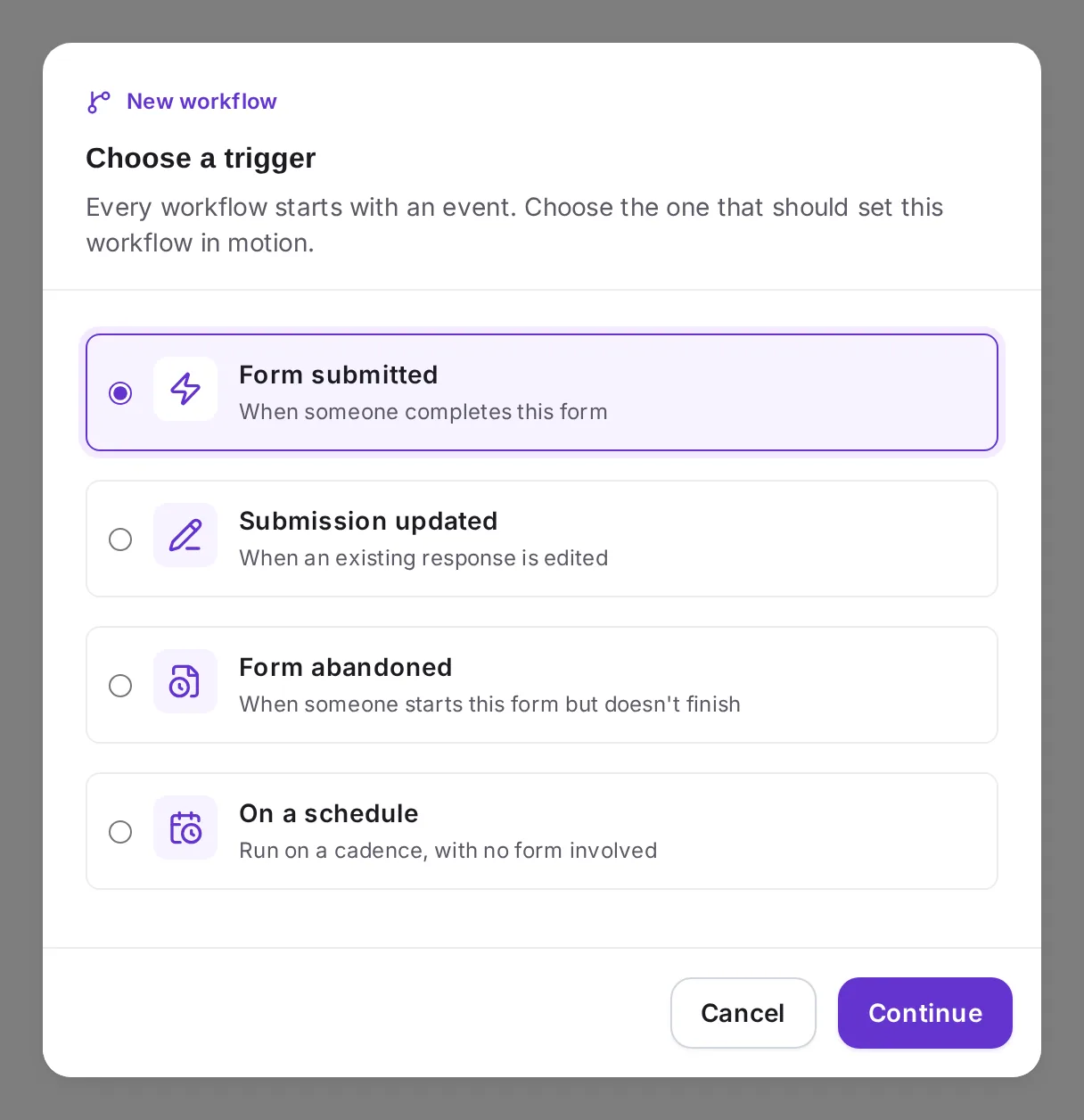
Every workflow begins with a trigger. Pick the event that should set it in motion:
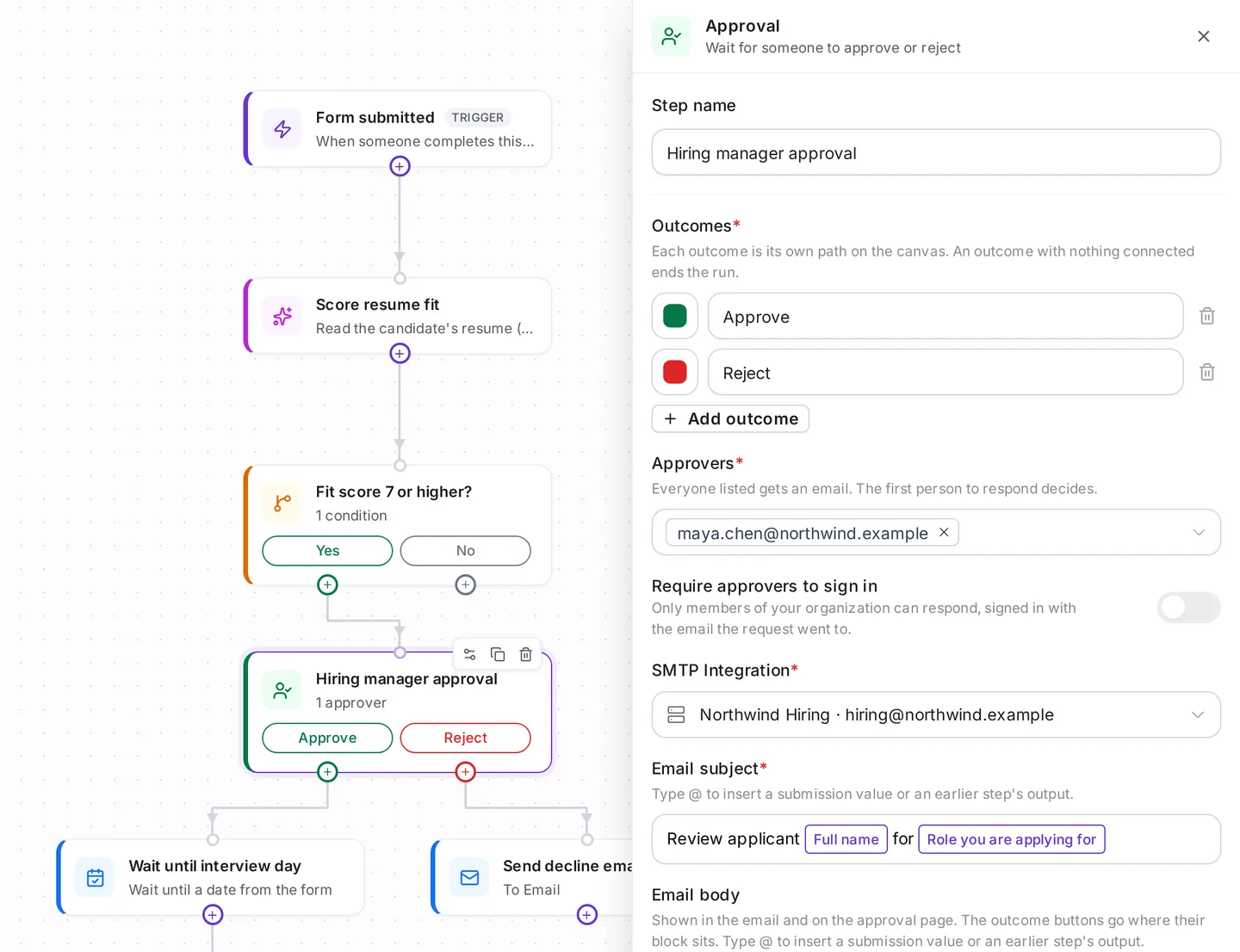
Add an Approval step when a person needs to decide before work continues. Approval emails go out from your connected Gmail, Outlook or SMTP account.
Use conditions to split the path by an answer or by an earlier step’s result, such as an AI label. Route by department, request type, location, priority or any other choice in the form. Branches can run side by side and continue when all of them finish or as soon as the first one does. You can also stop a run early and record the reason.
Add an AI Agent step to summarize, classify, score or extract details with a plain-English prompt. It reads the current submission, can open uploaded PDFs and images such as a resume, and can look up earlier submissions to the same form. It saves its results to custom fields for later steps, and your original answers are never changed.
Pause a workflow for minutes, hours or days, up to 30 days. Or wait until a set date, a date from the form, or a booked appointment time, each in the right time zone. Use it to follow up after a set period, after an appointment, or on the day of an interview.
Send submission data to your CRM, ATS or any other API with a webhook, including Zapier and Make. Set the method, body, headers and parameters your system needs.
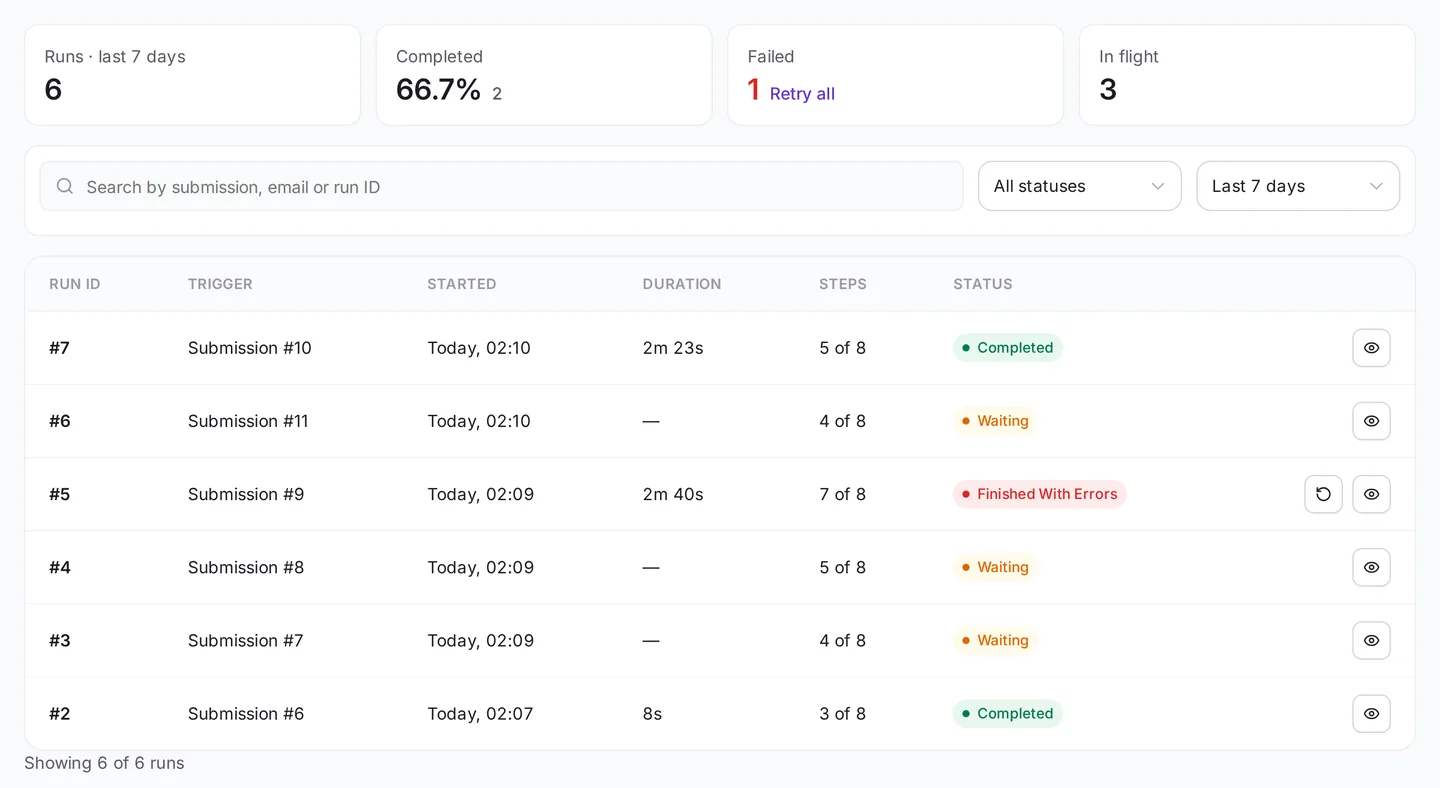
You can check what every workflow did after it goes live, and fix a failed run without starting over.
Each one is a trigger plus a handful of steps. Start with the closest match, then change it to fit your process.
A request form starts the workflow. The approver gets the request by email, picks an outcome, and the requester gets the result automatically. Use it for budget, purchase, leave and access requests.
An AI Agent labels each demo or contact request as hot or not yet. Hot leads alert sales and go to your CRM with a webhook. The rest get a timed follow-up email.
The AI Agent reads the attached resume, saves its notes to a custom field and says whether to shortlist. The hiring manager approves shortlisted candidates, and approved ones get a reminder on the interview day.
When your team changes an order or request status to Approved, Formester can email the customer and sync the change to another system.
Read the booked slot from the form, wait until the appointment time, then send a thank-you or feedback request after a short delay. Booked slots come from the appointment scheduler on the Business plan.
When someone starts a form and goes quiet, Formester waits for the period you set and sends a link to continue from where they stopped. The Form abandoned trigger is on the Business plan.
Send another form to one person, such as a document request after an application, with fields filled in from the first one. The workflow waits for their reply. If you set an expiry and they don’t answer in time, the run takes the Expired path instead, for example to remind them or alert your team.
No code and no second tool. Workflows live inside Formester, next to the form that feeds them.
Choose a form and the moment to react to: submitted, updated, abandoned or a schedule.
Drop in AI, conditions, approvals, waits, emails and webhooks. Type @ in any step to recall an answer or an earlier step’s output.
Run the workflow on one of your 10 latest responses and see what each step returned before going live.
Publish the workflow and use run history to see completed, waiting and failed runs.
Want every step type and setting in detail? See the form workflow builder.
Zapier, Make and n8n are strong tools for connecting many apps. For work that starts with a form, keeping intake and workflow management together removes a layer of setup, mapping and maintenance.
| Formester Workflows | Form plus Zapier or Make | |
|---|---|---|
| Where the workflow lives | In the same app as the form | Separate app and account |
| Extra subscription | Runs are included in your Formester plan | Usually a second bill |
| Edit and abandonment triggers | Built in (abandonment on Business) | Depends on the form tool |
| Using form answers | Type @ to pick any field | Map fields by hand |
| AI step | Built in, uses your plan’s AI credits | Separate AI app or API key |
| Testing | Test on one of your last 10 submissions | Varies by tool |

"Combined with the AI agent workflow automation after forms are submitted, it’s one amazing package."
"Formester solves the problem of complicated data collection by providing a quick tool to create customized and automated forms."
"We are able to easily build so many forms for our daily business work. These are easy for sharing too with our clients at one time instantly."
"The conditional logic, file uploads, and integrations with popular tools like Mailchimp and Zapier make Formester extremely versatile too."
"Formester offers a ton of features and my developer loves using it to integrate to various marketing pages."
AI Agent steps also use your plan’s AI credits. Compare Formester plans to see what each one includes.
Find answers to common questions below, or reach out to our team for more help.
Give every request, application, lead, booking and approval a path your team can see and trust. Build the workflow once, then Formester runs it the same way every time.
Start with 100 free workflow runs a month.