You send the same document over and over: a contract, an invoice, a certificate, an onboarding pack. Only the names, dates and numbers change, and copying them in by hand is slow and invites typos. Document generation software fills a template with fresh data and gives you a finished file every time.
The best document generation software for you depends on one question: where does your data start? A form someone fills in, a CRM record, a spreadsheet and a Microsoft 365 flow each point to a different tool. This list covers everyday business documents like contracts, quotes, certificates and reports. Lists of document automation software often focus on legal document assembly, which is a separate category.
Quick picks by use case
- Forms and documents in one tool: Formester
- Sales proposals and quotes with e-signature: PandaDoc
- Form-driven documents inside a bigger suite or Salesforce: Formstack Documents
- Templates fed by Zapier or Make on a small budget: Docupilot
- Best for Airtable: Documint, or Docupilot if you also need Word output
- Microsoft 365 and Power Automate: Plumsail Documents
- Google Sheets and Google Forms on the cheapest plan: Documentero
- Enterprise Salesforce: Conga Composer or Docusign Gen
- Brand-controlled Office templates at enterprise scale: Templafy
Best document generation software at a glance
| Tool | Best for | Where the data starts | Output | E-signature | Starting price |
|---|---|---|---|---|---|
| Formester | Forms and documents in one tool | Its own forms | Drawn in the form, printed on the PDF | $45/mo (Business) | |
| PandaDoc | Sales proposals and quotes | Its editor, CRMs | Built in | $19/seat/mo | |
| Formstack Documents | Form-driven docs in a suite | Formstack Forms, Salesforce, 40+ apps | DOCX, PPTX, XLSX, PDF | Formstack Sign (Suite) | $250/mo (Suite) |
| Docupilot | Small-team template automation | Zapier, Make, Airtable, API | PDF, DOCX, HTML | Paid add-on | $29/mo |
| Documint | No-code PDFs from Airtable | Airtable, Zapier, Make, API | Included (5/mo) | $39/mo | |
| Plumsail Documents | Microsoft 365 teams | Power Automate, its web forms, API | DOCX, XLSX, PPTX, PDF | Built in | $25/mo |
| Documentero | Google Sheets on a budget | Google Sheets, Google Forms, API | DOCX, XLSX, PDF | No | Free, then $19/mo |
| Conga Composer | Enterprise Salesforce | Salesforce records | Word, Excel, PowerPoint, PDF | Conga Sign or Docusign | Quote only |
| Docusign Gen | Salesforce teams on Docusign | Salesforce, CPQ | Word, PDF | Docusign eSignature | $20/user/mo |
| Templafy | Brand control in Office | Microsoft 365, CRM | Word, PowerPoint, PDF | No | $40/user/mo |
Prices as of October 2026. Annual billing where the vendor offers it; Documentero and Docupilot show monthly prices.
How to choose document generation software
Most document generation tools can merge data into a template. The differences show up in where they get that data, what file they hand back and what each document costs you. Check these before you book a demo:
- Where the data starts. If people type the details into a form, pick a tool where the form and the template live together. If the data already sits in Salesforce, HubSpot, Airtable or a sheet, pick a tool with a direct connection to it, so you skip a Zapier step that can break.
- The file you must send. A signed agreement or a certificate is best as a PDF that nobody can edit. If the recipient has to keep editing the file, you need Word, Excel or PowerPoint output.
- How signatures work. Some tools capture the signature inside the form, so the document is signed the moment it is created. Others send the finished file out for signature, with reminders and a signing order.
- How you build templates. You can upload a Word or PDF file you already use, design one in an editor or, in some tools, describe it and let AI draft it. Uploading your own file is fastest when your lawyer or brand team has already approved it.
- The price at your volume. Pricing is per seat, per document or a flat fee. Work out the cost at the number of documents you send each month, not the headline price.
The 10 best document generation software tools
1. Formester
Best for: teams whose documents start with a form, like contracts, intake packs, certificates and order confirmations.
Formester is a form builder with a PDF Editor inside each form. You design the PDF once, and every submission fills it with that person's answers. The form and the template live in the same place, so there is no export or Zapier step between them. See how Formester's document generation works for contracts, certificates and quotes.
What makes it stand out
- You can start a template three ways: build it in the drag-and-drop editor, upload a PDF you already use, or describe the document and let AI create it.
- Type @ to place any answer on the PDF, including calculations, repeater rows (printed as a table), file uploads and the respondent's drawn signature.
- Each finished PDF can go out by autoresponder, in your notification email, through a workflow email step, to Google Drive or by webhook. Respondents can also download it from the thank-you page.
- Some templates, like the freelance contract and the NDA, come with their PDF already connected, and the contract generator builds a contract form for you with AI.
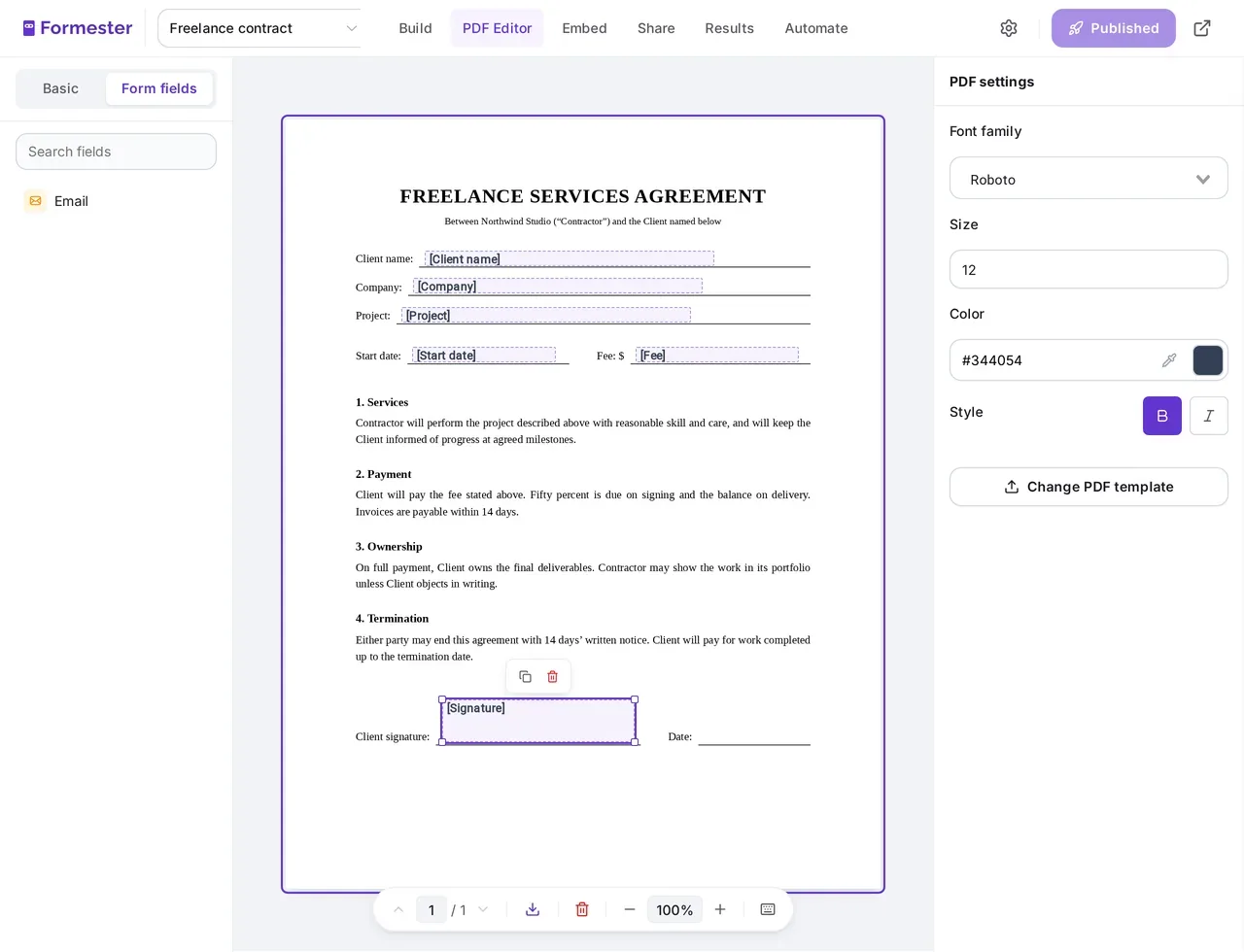
If you only need a clean record of every answer, you can also turn form submissions into PDFs with a ready-made layout and no template work. The guide to auto-filling and signing PDFs with a form shows the full setup.
Pricing
- Free plan: Yes, for forms. Documents is part of the Business plan.
- Business: $45/month billed yearly ($49 monthly), as of October 2026. No per-document fee.
- No second tool or Zapier step between the form and the document.
- Flat monthly price instead of a fee per document.
- Respondents get their copy the moment they submit.
- One PDF template per form.
- Built for documents that start from a form, not from a CRM record.
2. PandaDoc
Best for: sales teams that send proposals, quotes and contracts and need them signed.
PandaDoc is a document editor with e-signature built in. Sales teams build a proposal or quote once, fill it with deal data from a CRM such as HubSpot or Salesforce, and send it for signature from the same screen. If its per-seat price is too high for your team, the rest of this list covers the main PandaDoc alternatives for document generation.
What makes it stand out
- A drag-and-drop editor with a template library. Business adds pricing tables, a content library and custom branding.
- Unlimited e-signatures on paid plans, with signing order, an audit trail and real-time tracking.
- CRM integrations, approval workflows and payment collection on the Business plan.
Pricing
- Starter: $19/seat/month billed annually ($35 monthly), as of October 2026.
- Business: $49/seat/month billed annually.
- Free trial: 14 days, no card.
- Writing, sending, tracking and signing happen in one tool.
- Strong for quotes, with pricing tables and payments on Business.
- Per-seat pricing adds up as the team grows.
- Documents created through the API, Zapier, Make or forms use paid usage credits.
- Smart content, which changes a document based on rules, is Enterprise only.
3. Formstack Documents
Best for: teams already on Formstack Forms or Salesforce that need Word, PowerPoint or PDF output.
Formstack Documents merges data from Formstack Forms, Salesforce, CSV files and 40+ other apps into templates you upload. Formstack sells it in its Suite plan, together with Forms and Sign.
What makes it stand out
- Upload Word, PDF or PowerPoint templates, or start with the AI builder.
- Outputs DOCX, PPTX, XLSX and PDF.
- Conditional logic shows or hides parts of a document based on the data.
Pricing
- Suite: $250/month billed annually ($299 monthly), as of October 2026, with 250 document deliveries a month. This is the cheapest plan with document generation.
- Forms plan: $83/month billed annually, without document generation.
- Free trial: Yes.
- Many data sources and output formats.
- Forms, documents and signatures from one vendor.
- You pay $250 a month before you create a single document.
- The Suite caps you at 250 document deliveries a month.
4. Docupilot
Best for: small teams that want Word or PDF templates filled from Zapier, Make, Airtable or an API.
Docupilot is a template engine. You upload a Word, PDF, PowerPoint or Excel template, add merge fields, and send data in from one of its 70+ integrations, a webhook or its REST API.
What makes it stand out
- Templates from Word, PDF, PPTX or XLSX files, or from its no-code builder.
- Conditional sections and repeat blocks for line items.
- Output as PDF, DOCX or HTML.
Pricing
- Starter: $29/month for 100 documents and 1 seat, as of October 2026.
- Plus: $99/month for 500 documents and 3 seats.
- E-signature add-on: $1.50 per envelope, falling to $0.75 at volume.
- Free trial: 14 days, no card.
- Works with the template files you already have.
- Low entry price for low volumes.
- Data has to arrive through an integration or the API.
- Signatures cost extra for each envelope.
5. Documint
Best for: Airtable users who want polished PDFs without code.
Documint fills a drag-and-drop PDF template with each record from Airtable, Zapier, Make, Coda, HubSpot, Jotform or its REST API. It suits invoices, packing slips and reports built from rows of data.
What makes it stand out
- A visual editor for laying out the PDF.
- Loops and logic for line items and conditional text, without code.
- A direct Airtable connection.
Pricing
- Silver: $39/month billed annually, as of October 2026, for 2,400 documents a year and 5 signature envelopes a month.
- Free trial: 14 days.
- Fits Airtable bases closely.
- Handles line items and logic without code.
- PDF output only.
- Only 5 signature envelopes a month on the entry plan.
6. Plumsail Documents
Best for: Microsoft 365 teams that automate with Power Automate.
Plumsail Documents fills Word, Excel and PowerPoint templates from Power Automate, Azure Logic Apps, Zapier or its REST API. It can also turn a template into a web form, so people fill in the details and get the document straight away.
What makes it stand out
- A Power Automate connector that fits existing Microsoft 365 flows.
- Outputs DOCX, XLSX, PPTX and PDF.
- Built-in e-signature.
Pricing
- Folder: $25/month billed annually ($29 monthly), as of October 2026, for 200 documents a month.
- Drawer: $84/month billed annually for 1,000 documents a month.
- Extra documents: $15 per 100.
- Free trial: 30 days, no card.
- Keeps Office files editable.
- Fits teams that already run flows in Microsoft 365.
- Getting the most from it means learning Power Automate.
- Every process run, connector action or API call counts as one document.
7. Documentero
Best for: Google Sheets and Google Forms users on a tight budget.
Documentero fills Word and Excel templates from Google Sheets, Google Forms, its own shareable forms, Zapier, Make or an API. You upload a DOCX or XLSX file with fields marked, or build the template in its online editor.
What makes it stand out
- Add-ons for Google Sheets and Google Forms.
- Outputs DOCX, XLSX and PDF.
- A free tier you can try with real data.
Pricing
- Free: 50 documents in total and 3 templates.
- Micro: $19/month for 100 documents a month and 5 templates, as of October 2026.
- Mini: $39/month for 300 documents a month and 10 templates.
- The lowest monthly-billed price on this list.
- Works with Google tools many small teams already use.
- Every plan caps the number of templates.
- No built-in e-signature.
8. Conga Composer
Best for: large Salesforce teams with complex documents.
Conga Composer runs inside Salesforce. It pulls data from Salesforce records and their related objects into Word, Excel, PowerPoint or PDF templates and can email the result.
What makes it stand out
- Native to Salesforce, so it can use data from records and their related objects.
- Outputs Word, Excel, PowerPoint, PDF and email.
- Signatures through Conga Sign or Docusign.
Pricing
- Price: Not public as of October 2026. Contact sales for a quote.
- Trial: Demo on request.
- Deep access to Salesforce data.
- A mature, widely used product with over 900 reviews on G2.
- No public pricing.
- Setup usually needs a Salesforce admin.
9. Docusign Gen
Best for: Salesforce teams that already send agreements with Docusign.
Docusign Gen for Salesforce creates agreements from Salesforce data, including CPQ quotes, and sends them for signature through Docusign eSignature. Admins set up templates with clicks inside Salesforce.
What makes it stand out
- One flow from creating the document to getting it signed.
- Outputs Word, PDF or Docusign formats.
- Also included in some Docusign eSignature plans.
Pricing
- Price: From $20/user/month, as of October 2026.
- Requirement: A Docusign for Salesforce account.
- Free trial: Through the Salesforce AppExchange.
- Generation and signing in one Salesforce flow.
- A small add-on cost if you already pay for Docusign.
- Only works inside Salesforce.
- Needs a Docusign eSignature subscription on top.
10. Templafy
Best for: large companies that need every Word and PowerPoint file on brand.
Templafy manages templates inside Microsoft Office. Staff create documents from approved templates without leaving Word or PowerPoint, and AI document agents can draft content from company data.
What makes it stand out
- One central template library inside Word and PowerPoint.
- Template governance, so staff always start from the approved version.
- AI document agents and CRM connections.
Pricing
- Team: $40/user/month for up to 25 seats, as of October 2026.
- Enterprise: Custom pricing.
- Free trial: 14 days on Team.
- Strong brand control across the company.
- Works inside the apps people already write in.
- No built-in e-signature.
- The Team plan stops at 25 seats, so larger rollouts need a custom quote.
Document generation tool vs document template creator
A document generation tool fills a template with data and hands back the finished file. A document template creator is the editor where you design that template. Most tools on this list include both, but they differ in how you start. Formester has a PDF Editor inside each form, where you can build a template, upload a PDF, or describe it for AI. Documint and PandaDoc use drag-and-drop editors. Docupilot, Formstack Documents, Plumsail Documents and Documentero work from Word, Excel or PowerPoint files you upload.
If you pick Formester, the template is part of the form, and Formester Workflows can route the result for approval or follow-up emails. If you only need a record of each response, form to PDF needs no template at all.
Document generation vs document automation
Document generation is one step: fill a template with data and produce the file. Document automation covers the whole path around that step, such as collecting the data, routing the file for approval, getting it signed and storing it. Most tools on this list do some of both.
The words also mean different things in different industries. In legal tech, document automation software usually means document assembly, where a lawyer answers an interview and the tool builds a contract from clauses. For contracts, quotes and certificates that follow the same layout every time, a document generation tool is usually enough.
Which document generation software should you choose?
Start with where your data lives today, then check the output format and the price at your monthly volume.
Data starts in a form: Formester.
Data starts in a CRM: PandaDoc, Conga Composer or Docusign Gen.
Data starts in a spreadsheet or Airtable: Documentero, Documint or Docupilot.
Data starts in Microsoft 365: Plumsail Documents or Templafy.
If your documents begin with someone filling in a form, document generation in Formester keeps the form, the template and the delivery in one place.
Turn every form submission into a branded PDF
Design the PDF once, and each submission fills it with the answers and the signature, then sends it where you choose. Documents is part of the Business plan.
Try Formester freeFree plan for forms · No credit card · 56,000+ teams