Create Secure SMS Verification Forms Easily
Verify real users with SMS OTP verification and stop fake submissions. Create secure SMS opt-in and verification forms to protect your data and improve form quality.
Start Building Forms for Free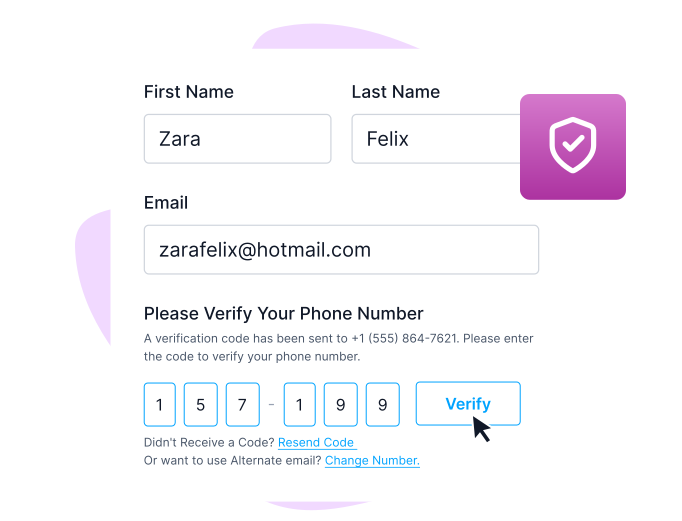










Trusted by 50,000+ Businesses Worldwide
Used by startups, agencies, and enterprises to create secure SMS verification forms and OTP-protected submissions.






Secure Your Submissions with OTP Verification Forms
Add SMS verification your forms to confirm real users and prevent fake submissions. Protect every SMS verification form with built-in phone validation.

Verify Real Phone Numbers with OTP
Confirm phone numbers using SMS OTP verification before form submission. Collect accurate data and block fake entries instantly.

Reduce Spam and Misuse
Only users who enter the OTP can submit. The system automatically stops bots and random submissions.

Country-Based Phone Validation
Users choose their country code first, preventing number format errors and SMS delivery failures.
Types of OTP Verification
SMS OTP Verification
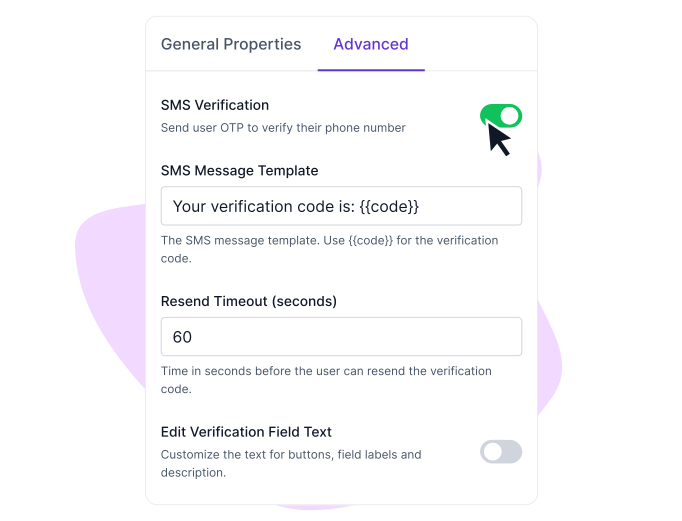
Use OTP verification to send a one time code by SMS and confirm phone numbers fast for signups and lead capture forms.

Email OTP Verification
Use OTP verification to send a one-time code to the inbox. Confirm email addresses before submission to ensure clean data.
How to Enable SMS OTP Verification?
STEP 1
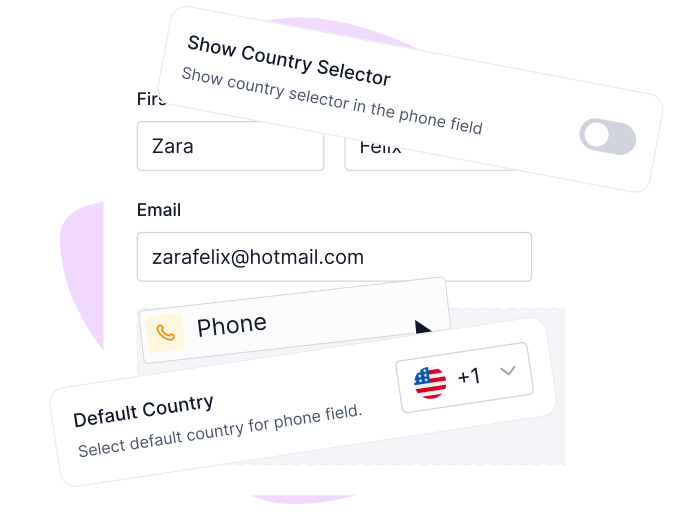
Add the phone field
Open your Formester builder.
Click Add Elements and choose the Phone field from the Personal section.
Place it anywhere in your form.
STEP 2
Customize phone settings
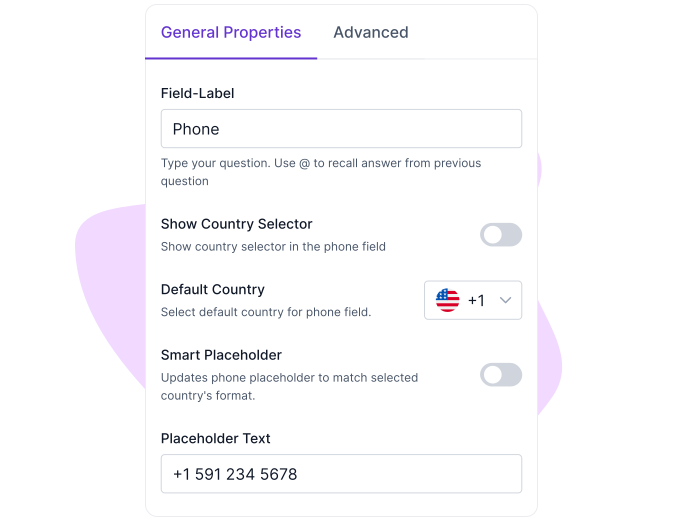
Select the phone field to open its settings.
Edit the label and choose a default country from the General tab.
STEP 3
Enable OTP verification
Go to the Advanced tab.
Turn on SMS verification to activate OTP for that field.
STEP 4
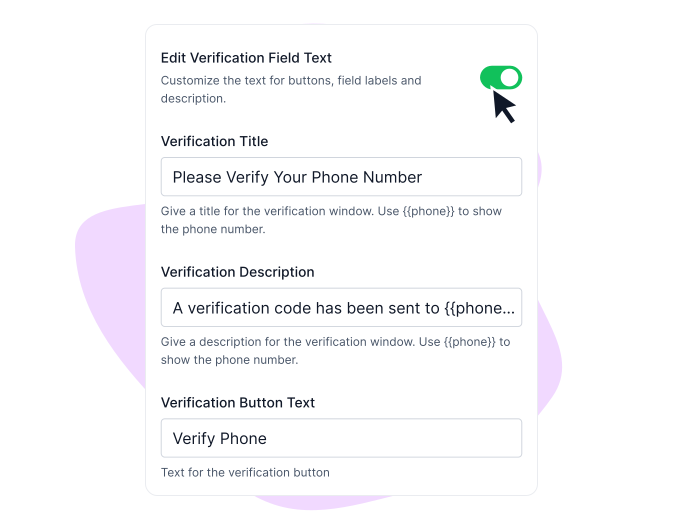
Create your SMS message
Write the SMS text users will receive with the OTP.
Set how long the OTP stays valid.
STEP 5
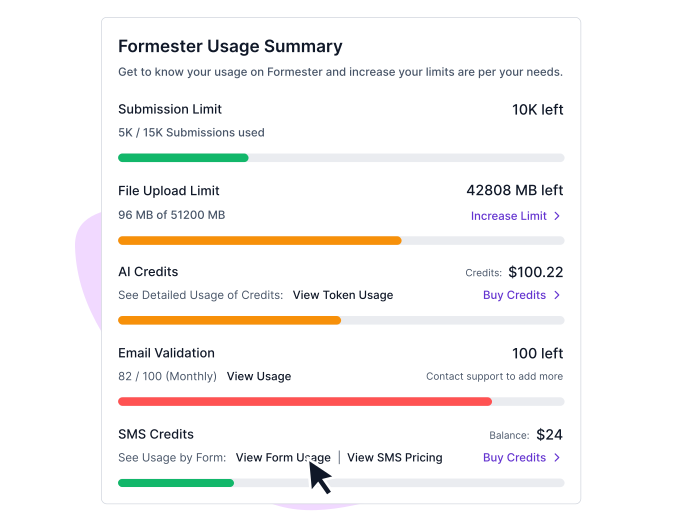
Track usage and manage credits
View SMS usage inside Billing and Plans.
Buy credits based on your country and volume needs.
Example use cases
Use SMS OTP verification forms to collect real user data, prevent fake submissions, and improve communication with verified customers.

Lead Generation
Use an SMS verification form to confirm real phone numbers before submission. Your sales team receives genuine, reachable leads instead of fake entries.
Perfect for lead generation forms where verified contact details improve conversion and follow-ups.

User Signups & Registrations
Stop fake accounts by confirming each user’s phone number with SMS OTP before signup completes.

Orders, Bookings, and Inquiries
Confirm customer phone numbers to prevent fake orders, missed bookings, and follow-up issues.
Pre-built templates
Get Started with ready-made Templates



USER TESTIMONIALS
Testimonials

Great software system. Very intuitive and looks absolutely great. Most importantly, I requested features… and the features were implemented within hours. Stellar support that is hands-down better than others. I highly suggest you use Formester… you’re not going to find that with the competition.

We have been in business for over thirty years and were never happy with our forms until we found Formester. Now, we have clients actually enjoying completing and submitting online forms. If you are looking for a platform to create online forms... look no further – Formester is the best. Your clients will thank you!

Formester is simple enough for non-developers and sophisticated enough for developers. I'd say being able to choose between simplicity and complexity is one of this product's strengths. In addition, the founder is available to answer questions and doubts, which does not happen every day.

Formester is really easy to use and an exceptional alternative for Typeform. We use it for call for papers, lead registrations, feedback and surveys and it cannot be simpler.

I use Formester for my form-building needs and I’m thoroughly impressed. The platform is rich with features… What really sets them apart is their exceptional customer service (responses typically within 10 minutes). The pricing is also very reasonable… Highly recommended!

Went through many form builders for my lead gen company and I will say it is by far the most affordable and customizable form I have found!! 10/10

Great software system. Very intuitive and looks absolutely great. Most importantly, I requested features… and the features were implemented within hours. Stellar support that is hands-down better than others. I highly suggest you use Formester… you’re not going to find that with the competition.
We have been in business for over thirty years and were never happy with our forms until we found Formester. Now, we have clients actually enjoying completing and submitting online forms. If you are looking for a platform to create online forms... look no further – Formester is the best. Your clients will thank you!
Formester is simple enough for non-developers and sophisticated enough for developers. I'd say being able to choose between simplicity and complexity is one of this product's strengths. In addition, the founder is available to answer questions and doubts, which does not happen every day.
Formester is really easy to use and an exceptional alternative for Typeform. We use it for call for papers, lead registrations, feedback and surveys and it cannot be simpler.
I use Formester for my form-building needs and I’m thoroughly impressed. The platform is rich with features… What really sets them apart is their exceptional customer service (responses typically within 10 minutes). The pricing is also very reasonable… Highly recommended!
Went through many form builders for my lead gen company and I will say it is by far the most affordable and customizable form I have found!! 10/10


Ready to build your perfect form?
Get access to advanced AI, unlimited forms & more. See pricing for more details.
FAQs
When a user enters their phone number, they receive an SMS with an OTP code. They must enter this code to submit the form.
When a user enters their phone number, an OTP is sent via SMS. The form is submitted only after the correct code is entered, ensuring genuine and verified submissions.
SMS verification helps prevent fake submissions, improves lead quality, and confirms real phone numbers. It is useful for lead generation, registrations, bookings, and order forms.
Yes. With Formester, you can create SMS OTP verification forms without coding. Simply add a phone field, enable OTP verification, and start collecting verified submissions.
Yes. SMS OTP validation blocks bots and fake users by allowing only verified phone numbers to submit forms, helping you collect genuine data and improve conversion quality.
SMS verification forms can be used for lead generation, user registrations, bookings, surveys, and order forms anywhere you need verified phone numbers and secure submissions.