Google Forms has no translate button. There is no language setting in the editor and no way to offer one form in two languages, which is why this question keeps ending up in forums rather than in Google's documentation. Three routes get you there, and they do quite different things to the data you end up with.
There is no built-in translation in Google Forms. Your options are to let the respondent's browser translate the page, install a Marketplace add-on that rewrites the form, or duplicate the form and translate it by hand. Browser translation changes only what is on screen. The add-on changes the form itself.
Which route to pick
The last column is the part most guides leave out, and it is usually what decides the answer.
| Route | What it gives you | What lands in your responses |
|---|---|---|
| Browser translation | Read-only translation, per respondent | Original language, because nothing in the form changed |
| Marketplace add-on | The form itself, rewritten | The translated language |
| A duplicated form | One controlled form per language | A separate response sheet per language |
1. Let the browser translate it
Anyone opening the form can read it in their own language, without you changing anything.
- Send the form link as normal.
- The respondent opens it in Chrome, Edge or Safari and accepts the translate prompt, or right-clicks and picks Translate.
- The questions render in their language straight away.
Where it stops. Nothing about the form changes, so this is display only. It relies on each respondent noticing the prompt, and it does not translate images or text inside images.
2. Use a Marketplace add-on
One click rewrites the whole form into another language.
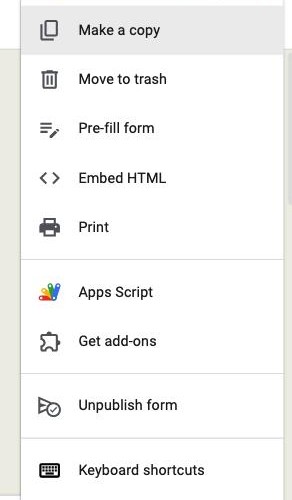
- In the form editor, open the three-dot menu and choose Get add-ons.
- Search for Forms Translator and install it.
- Open it from the add-ons menu, choose your target language and run it.
Where it stops. It is a third party with edit access to your forms, which some IT departments will not approve. Translation quality is machine translation, so labels that matter need a human read afterwards.
3. Duplicate the form per language
A separate, fully controlled form for each language.
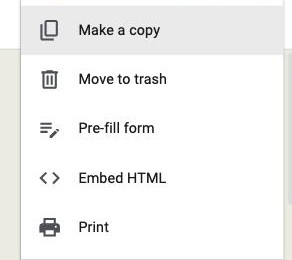
- Open the form, use the three-dot menu and choose Make a copy.
- Translate every question, option and description by hand, or paste in translations you already have.
- Share the right link with the right audience.
Where it stops. Every language becomes its own form with its own response sheet, so a five-language campaign means five forms to keep in sync and five sets of results to merge.
What the Forms Translator add-on actually does
It is the top result for this search, so it is worth being specific about it. Forms Translator is published by Translator for Forms and sits on the Google Workspace Marketplace with more than 191,000 installs, free of charge at the time of writing.
- Translates a whole form in one action rather than field by field
- Advertises 130+ languages, running on Google Translate underneath
- States that your data stays in your Google account and is not copied to its own database
Because it edits the form, the questions your respondents see are the translated ones, and so are the answers that come back. That is the opposite of browser translation, and it is the reason to decide which you want before you send the link.
Translating a Google Form on a phone
There is no Google Forms mobile app, so a form on a phone is a web page in a mobile browser, and the browser does the work.
- Chrome on Android. Open the form, tap the three-dot menu, then Translate.
- Safari on iOS. Tap the page settings icon in the address bar, then Translate to.
Editing a form on a phone is a different matter. The add-on route needs the desktop editor, so build and translate on a computer and treat the phone as the respondent's device.
Translating a Google Form to Spanish, or any single language
None of the three routes has a special case for a particular language. Pick Spanish in the browser prompt, in the add-on's target dropdown, or in your own translation of a duplicated form.
What does change by language is how much a machine translation can be trusted. Formal register, gendered nouns and anything legal are the places a machine gets it close but not right, so have a speaker read the output before it goes to a real audience.
What none of the three routes fix
Every route above solves the reading problem. None of them solves the collecting problem.
- No language switcher. A respondent cannot choose their language on the form. Either their browser offers it or they read whatever you sent.
- Mixed-language free text. Whatever route you pick, people type paragraph answers in their own language, so open questions arrive multilingual.
- Duplicated forms fragment your data. Five languages means five response sheets to merge before you can report on anything.
- Nothing tells you which language someone used. There is no field recording it, so you cannot segment by language afterwards.
Why Formester's multi-language forms are the better choice
One form in every language, with a single response table underneath.
- Add each language as a translation of the same form rather than duplicating it, so there is one form to maintain (Business plan)
- A language switcher on the form itself, so the respondent picks what they read instead of relying on a browser prompt
- Every language flows into a single response table, so nothing needs merging before you can report
- AI translation covers 180+ languages, and you can edit any translation by hand where the wording matters
Related reading
- Build a questionnaire in Google Forms - structure and question types before you translate anything.
- View responses in Google Forms - where multilingual answers actually land.
- Make an anonymous Google Form - the other setting people expect to find and cannot.
- Google Forms alternatives - for when one form in many languages is the requirement.