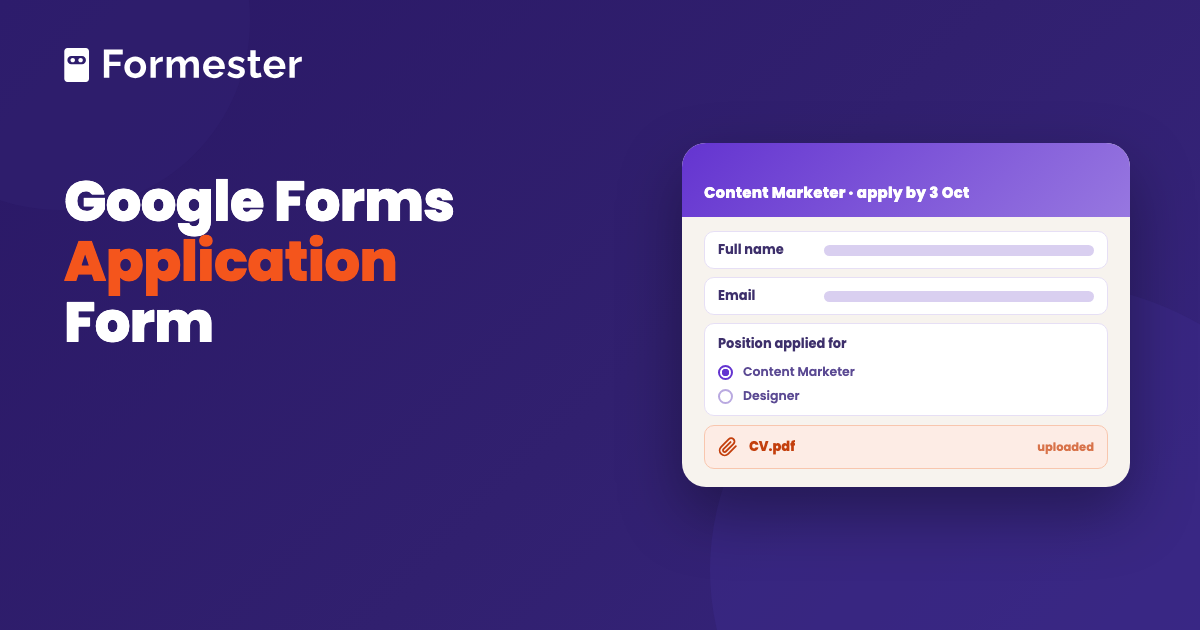
An application form in Google Forms is the applicant's details plus a File upload question for the CV, and you can have one collecting applications in about twelve minutes. Settle one thing before you send the link: the moment a form asks for a file, Google makes every applicant sign in to a Google account. For a job ad that reaches people on their phone, that is the difference between forty applications and twenty.
Quick answer
- You are hiring this week: blank form, ask for name, email, the role and a short answer on why they are applying, then add a File upload for the CV. Twelve minutes.
- You want the CV: File upload is the only way, and it requires a Google account. Asking for a link to a CV instead keeps the form open to everyone.
- You want to shortlist: push responses to a Google Sheet and run the pipeline there. Google Forms has no review step, no status, no scoring.
How do you create an application form in Google Forms?
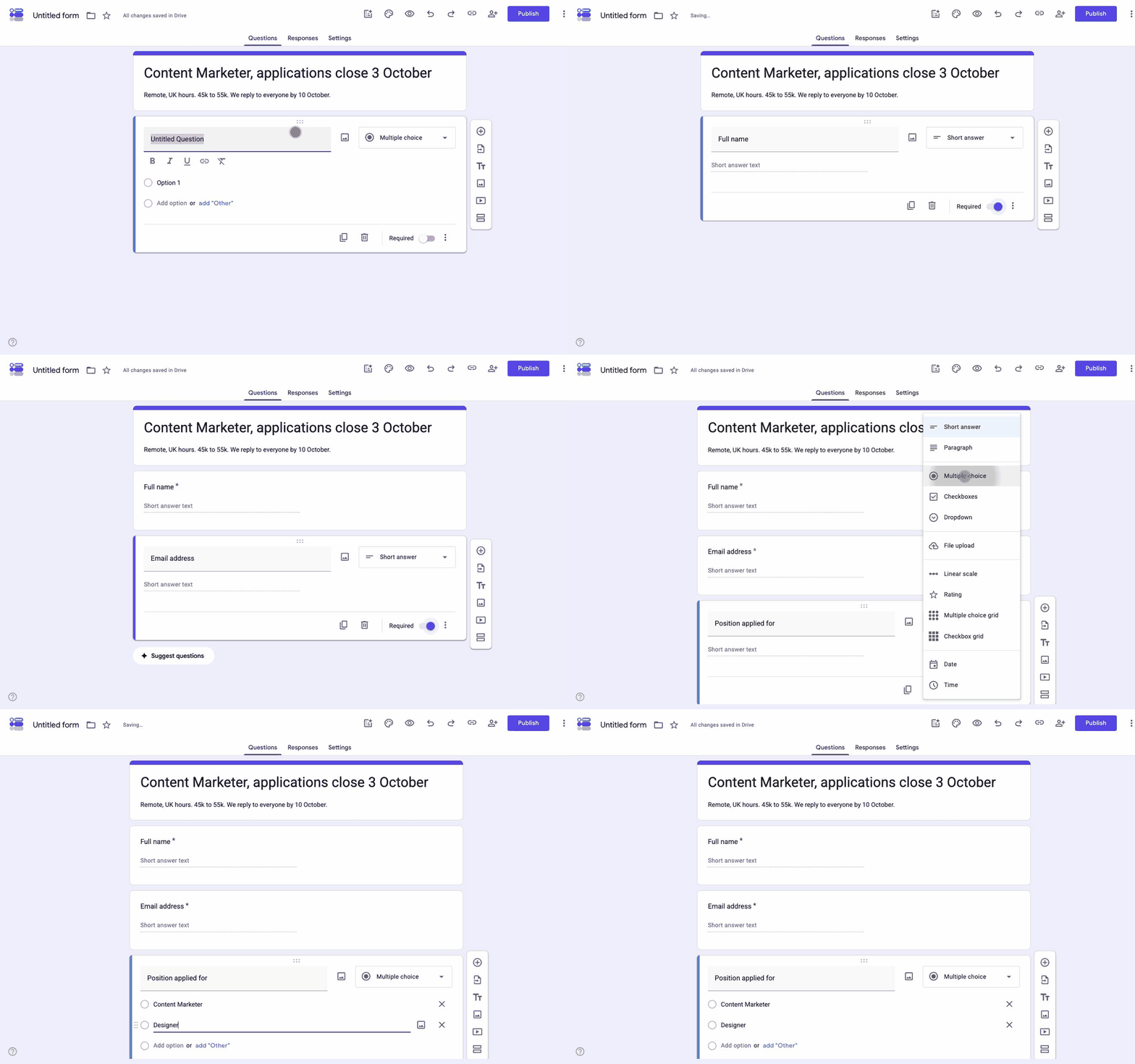
Six steps. None of them need a paid Workspace plan.
-
Start a blank form and name it after the role
Open forms.google.com and click Blank form. Name it with the role and the closing date, for example "Content Marketer, applications close 3 October". Applicants see that name at the top of the form, and you will thank yourself when there are four open roles in Drive.
-
Put the job details in the description
The line under the title is the description. Salary range, location or remote policy, the start date and what happens after they apply all go here. Candidates who cannot find the salary either ask you or drop out, and the ones who ask are the minority.
-
Ask who they are
Two Short answer questions to start: full name and email address. Mark both Required. A phone number is worth adding only if you actually phone-screen.
-
Ask what they are applying for
If more than one role is open, add a Multiple choice question listing them. One form with a role picker beats four near-identical forms, because every response then lands in one spreadsheet you can filter.
-
Add the questions that actually sort applicants
Two or three Paragraph questions do more work than a long list of tick boxes. Ask about the specific thing the job needs rather than for a summary of their CV, which you are about to receive anyway. Keep the total question count in single figures.
-
Set the response rules, then publish
Open Settings and expand Responses. Set Collect email addresses to Verified so you have a reliable reply address, and turn on Send responders a copy of their response so every applicant gets proof they applied. Then click Publish, set the responders to Anyone with the link, and take the URL from the Copy responder link panel.
If you would rather not start from an empty page, the template gallery on the Google Forms home screen has a Job Application template, and we keep a rundown of the Google Forms templates worth using.
Which questions should an application form ask?
Ask what changes your decision. Every extra question costs you applicants, and the drop-off on a twenty-question application is brutal. Here is a list to copy for a job application, grouped by why you are asking.
| Question | Type | Required | Why you need it |
|---|---|---|---|
| Full name | Short answer | Yes | Everything downstream |
| Email address | Short answer | Yes | The only channel you will use |
| Phone number | Short answer | No | Only if you phone-screen |
| Position applied for | Multiple choice | Yes | Filtering one sheet instead of four forms |
| Are you authorised to work in this country? | Multiple choice | Yes | The one screening question that saves everyone time |
| Years of relevant experience | Multiple choice, banded | Yes | Sortable, unlike a free-text answer |
| CV or resume | File upload | Yes | Read the sign-in warning below first |
| Link to portfolio or LinkedIn | Short answer | No | Often more useful than the CV |
| Why this role, in a few sentences | Paragraph | Yes | The answer that actually sorts the pile |
| Earliest start date | Date | No | Only when the start date is tight |
| Salary expectation | Short answer | No | Ask only if you will act on it |
| How did you hear about this role? | Multiple choice | No | Tells you which job board to pay for next |
| Data consent | Multiple choice, yes or no | Yes | You are collecting personal data |
Two variants worth a line each. A school or programme application swaps the experience band for education history and usually adds a reference name with an email. A rental or membership application keeps the identity block, then asks for the reference, the start date and the consent to a check, and it needs a clear statement of what you will verify.
What to leave out: a date of birth, a photograph, or anything else you would not want to explain to a candidate who asks why you needed it. If a question would sit awkwardly in an equal-opportunities audit, it does not belong on the form.
How do applicants attach a CV or portfolio?
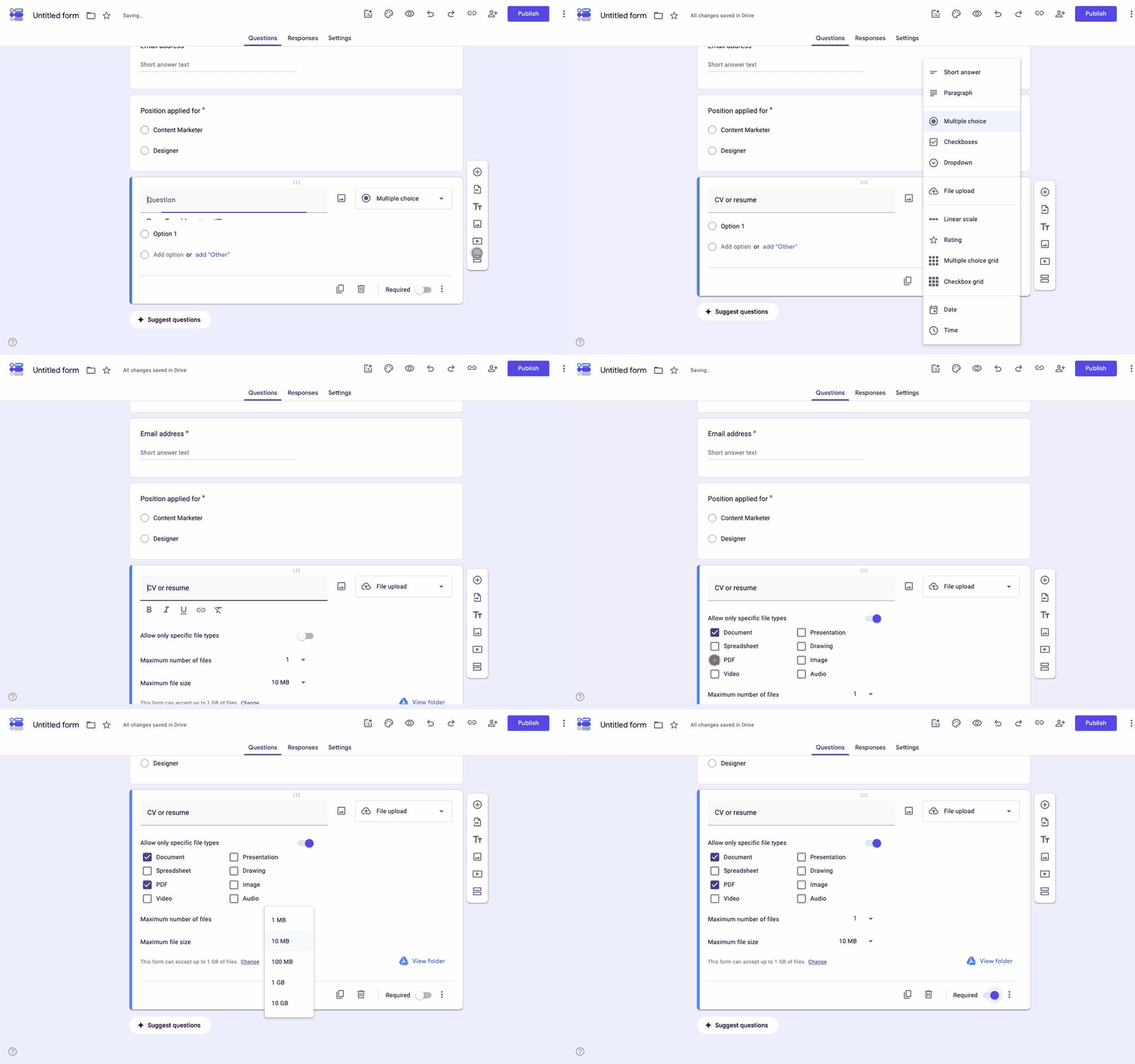
Add a question, open the type dropdown, then pick File upload. Google interrupts with a notice headed Let respondents upload files to Drive, and it is worth reading rather than clicking past, because it states the catch itself: "Files will be uploaded to the form owner's Google Drive. Respondents will be required to sign in to Google when file upload questions are added to a form." Click Continue and you get three settings:
- Allow only specific file types: off by default, which means anything goes. Turn it on and you get eight boxes to tick, covering Document, Presentation, Spreadsheet, Drawing, PDF, Image, Video and Audio. Document and PDF are the two you want, or somebody will send a Pages file.
- Maximum number of files: one for a CV. Two if you also want a cover letter, though a Paragraph question usually serves better.
- Maximum file size: five choices from 1 MB up to 10 GB, with the default of 10 MB being the right answer for a CV. Underneath, the form states its own total, "This form can accept up to 1 GB of files", with a Change link, because every upload lands in your Drive rather than the applicant's.
Files arrive in a folder Google creates next to the form and names after it, reachable from the View folder link on the question itself. The response row holds a link to each file, and that part works well.
Here is the part that does not. A File upload question makes every applicant sign in to a Google account. That is Google's own wording in the notice above, and there is no setting to disable it. Anyone without a Google account, or anyone who does not want to hand you an identity to apply for a job, stops at that screen. You will not see them in your response count, which is what makes this expensive: the form looks like it is working.
Two honest ways to deal with it:
- Ask for a link instead of a file: replace File upload with a Short answer question for a link to a CV in Drive, Dropbox or LinkedIn. The form stays open to everyone. The cost is that some links will be private and you will chase them.
- Take the sign-in on purpose: for an internal move or a student application, everyone already has an account and the upload is the better experience. Say so in the description so nobody is surprised.
If it is images rather than documents you need, photo uploads in Google Forms work the same way and carry the same sign-in requirement.
How do you review applications once they arrive?
Open the Responses tab. Individual shows one application per screen, which is the right view for reading, and the count beside the tab is your live total. That is where the built-in help stops.
Click Link to Sheets, choose Create a new spreadsheet, and work in there instead. Every application becomes a row and every question a column, with the CV link clickable. Linking a Google Form to Sheets covers the connection and what breaks it.
The spreadsheet is your pipeline, because Google Forms does not have one. Add three columns to the right of the last question and you have something workable:
- Status: a data-validation dropdown with New, Screening, Interview, Offer, Rejected. Colour it with conditional formatting and the sheet reads at a glance.
- Reviewer: who has actually read it, so two people do not interview the same candidate and nobody gets missed.
- Notes: one line per application, written while you read it rather than a week later.
Share the spreadsheet with the hiring panel, not the form. Anyone with editor access to the form can change the questions mid-campaign, which is how a required field disappears halfway through a job ad.
Do candidates take a Google Form application seriously?
Some do not, and it is worth knowing why. Search for Google Form job applications and you will find candidates asking each other whether a Google Form is normal or a sign of a scam, because the same form style is used by people harvesting personal data. A form with no branding, asking for a date of birth and an ID upload, from an address nobody recognises, earns that suspicion.
Four things fix most of it:
- Send it from a domain they can check: the form link in a job ad on your own careers page beats a bare forms.gle link in a message.
- Put a header image with your logo at the top: Google Forms has no logo slot, so the header image is the only branding you get. Use it.
- Say what happens next, with a date: "We reply to everyone by 10 October" in the description does more for completion than any design change.
- Ask for nothing sensitive: no ID documents, no date of birth, no bank details, ever, at the application stage. There is no legitimate reason and it is exactly what a scam form asks for.
If the role is senior or the brand matters, the honest answer is that a Google Form is the wrong front door, and a form on your own domain is worth the twenty minutes it takes.
What Google Forms cannot do for hiring
Straight list, so nothing surprises you in week two:
- No review or status step: nothing to approve, reject or move along. The spreadsheet is the whole workflow.
- No replies to candidates: beyond the automatic copy of their own answers, Google Forms sends applicants nothing. Every rejection and every interview invite is a manual email.
- No duplicate detection: the same person can apply five times and the form will take all five.
- No scoring or ranking: quiz mode can mark a right answer, but it cannot weigh experience against a written response.
- No CV parsing: a link to a document is all you get, so name, history and skills stay locked inside the file.
- Sign-in for uploads: covered above, and the single biggest cost.
- No branding past a header image: no logo slot and no fonts of your own, with the Google footer on every form.
For a handful of applications to a small team, none of that matters much. For a role that will pull three hundred, most of it does.
Where Formester fits
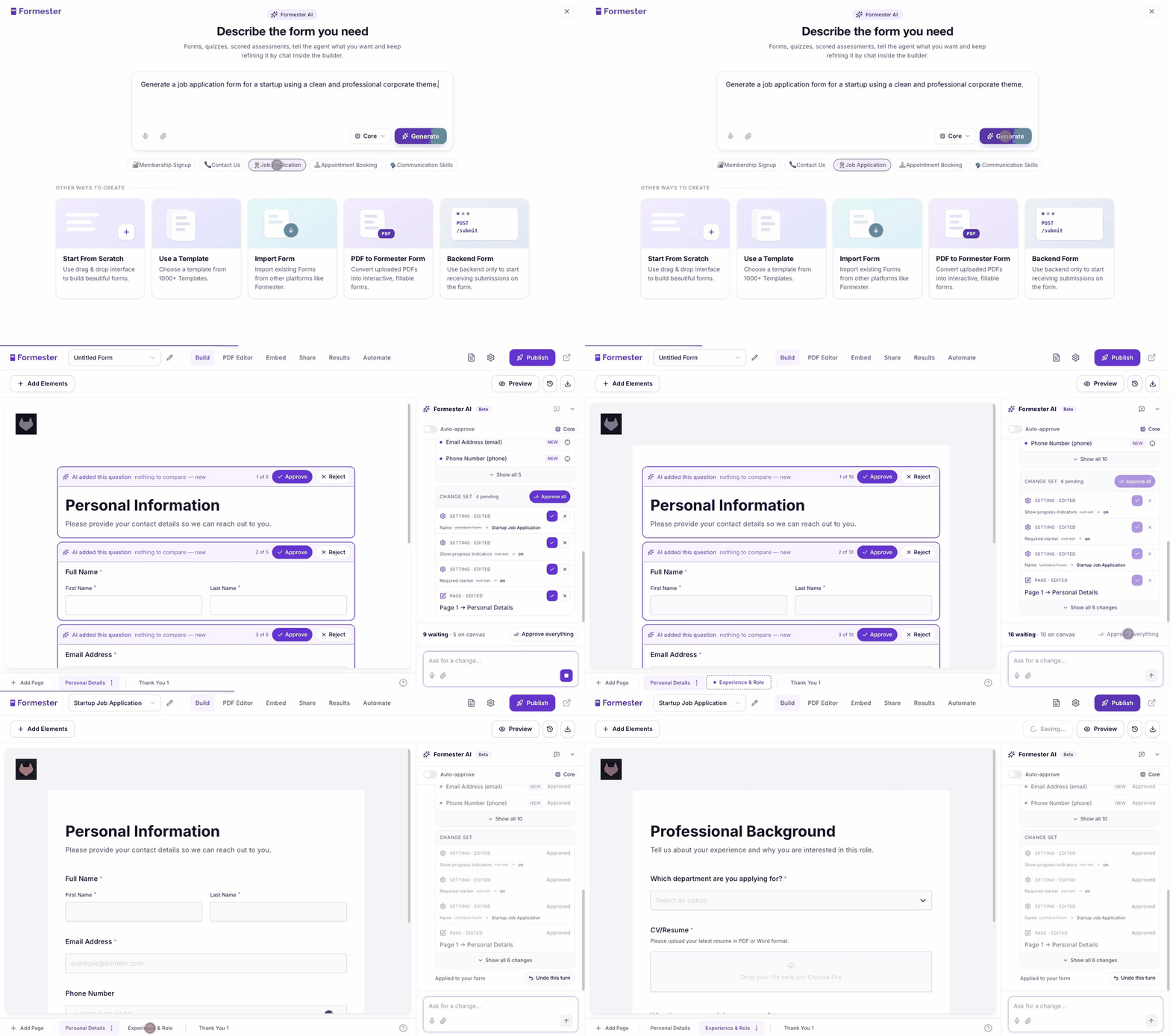
Start by not building it. The create screen has a Job Application starter, and clicking it writes the prompt for you. Hit Generate and the AI generator lays out the whole thing: a Personal Information page with name, email and phone, then a second page with a department dropdown and a CV upload that asks for a PDF or Word file. Each field arrives as a suggestion you approve or reject, so nothing lands on your form without you seeing it, and Approve everything takes the lot. Gemini is the engine, and the free plan covers two generations a day.
Then the gap that decides it for most hiring, which is the sign-in wall. File uploads on Formester sit on a public form, so an applicant attaches a CV without an account or a login. You still control what they can send, with allowed file types, a size limit and multiple files per question, and the free plan carries 100MB of storage.
Three other things carry weight on an application form. Every submission can be sent back to the applicant as a PDF of their own answers, which is the confirmation candidates keep. A native signature field records the signer's name, email and a timestamp, which matters when the application doubles as a declaration. And conditional logic means the questions change with the role someone picks, instead of every candidate reading every question.
What Formester does not do is run an approval chain for you. Applications arrive by email notification and land in your dashboard or a connected Google Sheet, and the shortlisting is still yours to run.
An application form that does not ask candidates to sign in
CV uploads on a public link, your branding at the top, plus a PDF confirmation to every applicant.
Try Formester freeFree forever · No credit card · 56,000+ teams
Related reading
- How to create an online application form, if you have not settled on Google Forms yet.
- Smarter job application forms, on the questions that predict a good hire.
- Automate screening with AI, for when the volume outgrows manual reading.
- Add sections in Google Forms, to split a long application across pages.
- Add conditional questions, so the form adapts to the role.
- Save a Google Form response as a PDF, for the applications you need to file.
- Job application form template, if you would rather start from something finished.
- How to use Google Forms, for the parts of the builder this page assumes.